Manuale Soleus SF004 Rise Tracker di attività

Hai bisogno di un manuale per il tuo Soleus SF004 Rise Tracker di attività? Di seguito è possibile visualizzare e scaricare gratuitamente il manuale in PDF in italiano. Questo prodotto attualmente ha 3 domande frequenti, 0 commenti e ha 0 voti. Se questo non è il manuale che desideri, contattaci.

Il tuo prodotto è difettoso e il manuale non fornisce alcuna soluzione? Rivolgiti a un Repair Café per il servizio di riparazione gratuita.

Manuale

Loading…
SLEEP, WAKE UP, WINDOW
Rise has a sleep timer that will track your total sleep, light sleep, deep sleep and percentage of your sleep
goal.
Using the app settings you can set the sleep timer to start manually or automatically. If you choose the
AUTO setting, the timer will start automatically at the pre-designated time every night. The device will notify
you when the sleep timer starts.
To start the sleep timer manually:
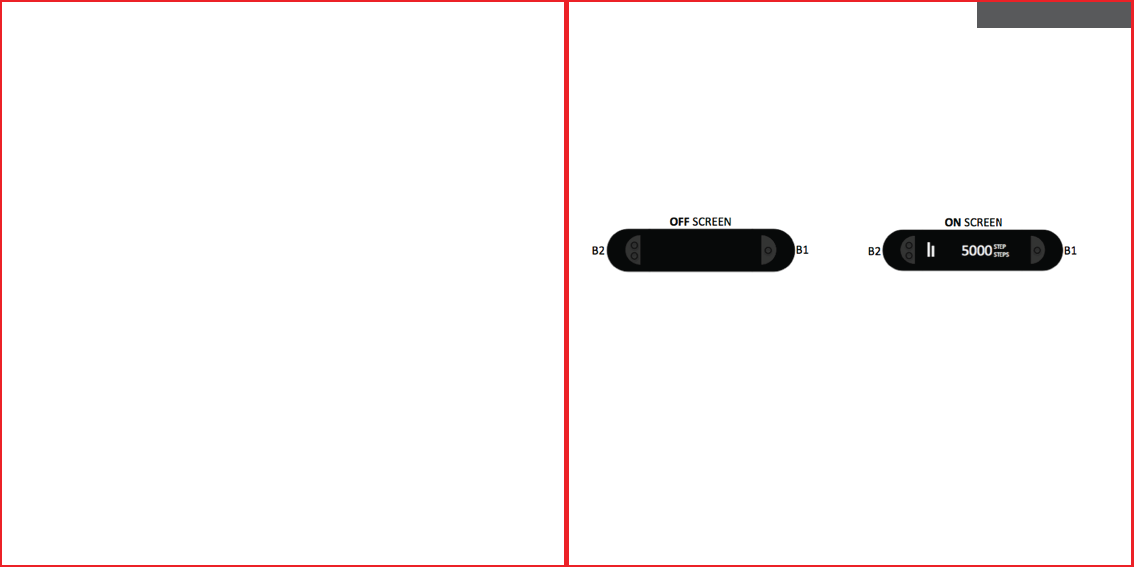
Press the B2 button until you get to SLEEP mode.
Press and hold the B1 or B2 button to start the timer.
Note: when the sleep timer is running the sleep-face icon will appear on the screen.
To manually stop the sleep timer:
Press the B2 button until you get to SLEEP mode.
Press and hold the B1 or B2 button to stop the timer- the device will auto-scroll through your TOTAL, DEEP
and LIGHT sleep statistics.
Using the app settings, you can set a vibrating Wake Up alarm. Wake Up works with the AUTO or MANUAL
sleep timer setting.
There is also a Window feature that works in conjunction with Wake Up to wake you up naturally if your Rise
senses light sleep during the “window of time” prior to your Wake Up setting.
Note: Auto, Manual, Wake Up and Window can only be set in the SLEEP section in SETTINGS on the SOLEUS
GO! app.
MOVE TIME
Rise will tell you if you’ve been sitting still too long and need to “move”. If it does not sense any movement
during your preferred time increment setting, Rise will vibrate and tell you to “MOVE”. You control this
feature in the MOVE TIME section in SETTINGS on the SOLEUS GO! app.
WATER RESISTANCE
Rise is water resistant but has not been designed for water sports. Should it become completely submerged
in water, dry it with a clean, dry cloth before pressing any buttons. The buttons should never be pressed
while the device is submerged in water. Ensure that the charging pads on the back of the device are dry
before attaching the charging cable.
FRENCH
BRACELET D'ACTIVITÉ SOLEUS « RISE » (SF004)
Merci d'avoir choisi le bracelet d'activité Soleus Rise. Ce guide est destiné à vous aider à configurer et
utiliser votre appareil le plus rapidement possible. Pour consulter la toute dernière version du manuel
d'instruction complet, rendez-vous sur WWW.SOLEUSRUNNING.COM.
CHARGEZ LA PILE !
Il est recommandé de charger la batterie pendant 3 heures avant la première utilisation.
Alignez les broches sur le câble de chargement avec les plaquettes métalliques à l'arrière de l'appareil.
Enroulez la bande de retenue et fixez-la en position. Branchez le câble sur le port USB de votre ordinateur
ou de l'adaptateur secteur.
Dans des conditions normales d'utilisation, l'autonomie de la batterie complètement chargée est d'environ
15 jours. Il est recommandé de ne pas laisser la batterie se décharger à moins de 10 % avant de la
recharger.
UTILISATION CLASSIQUE
Bouton B1 : ce bouton sert à faire défiler vos activités et vos statistiques d'entraînement quotidiennes, à
démarrer et à arrêter les chronomètres et à activer et désactiver Bluetooth.
Bouton B2 : ce bouton sert à faire défiler chacun des modes, à démarrer ou à arrêter les chronomètres et
à activer et désactiver Bluetooth.
Si l'écran est éteint, il est possible de l'allumer en appuyant sur le bouton B1 ou B2.
TÉLÉCHARGEZ L'APPLICATION SOLEUS GO! SOLEUS GO!
L'appli SOLEUS GO! est disponible pour les smartphones iPhone et Android. L'appli SOLEUS GO! est
nécessaire pour configurer l'appareil et vous permet d'améliorer le suivi permanent de votre condition
physique. Pour plus d'informations sur l'appli SOLEUS GO!, rendez-vous sur WWW.SOLEUSRUNNING.COM et
téléchargez-la gratuitement dans l'App Store ou sur Google Play.
COUPLAGE DU RISE AVEC VOTRE SMARTPHONE
Après avoir téléchargé l'appli SOLEUS GO! vous pouvez coupler votre Rise avec votre smartphone.
Sur votre bracelet Rise :
Appuyez sur le bouton B1 ou B2 pour allumer l'écran (l'heure actuelle s'affiche sur l'écran).
Maintenez le bouton B1 ou B2 enfoncé jusqu'à ce que le mot PAIR et le code d'identification de l'appareil
apparaissent sur l'écran (PAIR clignote).
Scarica il manuale in italiano (PDF, 0.36 MB)
(Rispetta l’ambiente e stampa questo manuale solo se è veramente necessario)

Loading…

Valutazione

Facci sapere che cosa pensi della Soleus SF004 Rise Tracker di attività valutando il prodotto. Vuoi condividere la tua esperienze con questo prodotto o porre una domanda? Ti preghiamo di lasciare un commento al fondo della pagina.
Sei soddisfatto di Soleus SF004 Rise Tracker di attività?
No
Valuta per primo questo prodotto
0 voti

Partecipa alla conversazione su questo prodotto

Qui puoi condividere cosa pensi di Soleus SF004 Rise Tracker di attività. Se hai una domanda, leggi prima attentamente il manuale. La richiesta di un manuale può essere effettuata utilizzando il nostro modulo di contatto.

Maggiori informazioni su questo manuale

Comprendiamo che sia bello avere un manuale cartaceo per i tuoi Soleus SF004 Rise Tracker di attività. Puoi sempre scaricare il manuale dal nostro sito web e stamparlo tu stesso. Se desideri avere un manuale originale, ti consigliamo di contattare Soleus. Potrebbero essere in grado di fornire un manuale originale. Stai cercando il manuale del tuo Soleus SF004 Rise Tracker di attività in un'altra lingua? Scegli la tua lingua preferita sulla nostra home page e cerca il numero del modello per vedere se è disponibile.

Specifiche

Marca Soleus
Modello SF004 Rise
Categoria Trackers di attività
Tipo di file PDF
Dimensione del file 0.36 MB

Tutti i manuali per Soleus Trackers di attività
Altri manuali di Trackers di attività

Domande frequenti su Soleus SF004 Rise Tracker di attività

Il nostro team di supporto cerca informazioni utili sul prodotto e risposte alle domande più frequenti. Se trovi un’inesattezza nelle nostre domande frequenti, ti preghiamo di farcelo sapere utilizzando il nostro modulo di contatto.

Quanti passi al giorno sono consigliati per gli adulti? Verificato

Per effettuare una quantità di movimento sufficiente, bisogna fare almeno 10 000 passi al giorno. Per le persone con più di 65 anni, i passi scendono a 8 000 al giorno.

È stato utile (142) Per saperne di più

Di quanto esercizio fisico ha bisogno un adulto medio? Verificato

Da adulto è una buona idea svolgere esercizi moderatamente intensivi per un totale di almeno 2,5 ore a settimana. Idealmente questo dovrebbe essere distribuito su più giorni.

È stato utile (24) Per saperne di più

Qual è la frequenza cardiaca massima durante l'attività fisica? Verificato

In generale puoi prendere una frequenza cardiaca di 220 e detrarre la tua età. Quindi per una persona di 48 anni la frequenza cardiaca massima sarebbe 220 meno 48 pari a 172. Se non sei sicuro delle tue condizioni personali, assicurati di consultare il tuo medico.

È stato utile (14) Per saperne di più

Manuale Soleus SF004 Rise Tracker di attività

Prodotti correlati

Categorie correlate

×
Download