Manuale Hoover HOC 709 X Forno

Hai bisogno di un manuale per il tuo Hoover HOC 709 X Forno? Di seguito è possibile visualizzare e scaricare gratuitamente il manuale in PDF in italiano. Questo prodotto attualmente ha 5 domande frequenti, 1 commento e ha 0 voti. Se questo non è il manuale che desideri, contattaci.

Il tuo prodotto è difettoso e il manuale non fornisce alcuna soluzione? Rivolgiti a un Repair Café per il servizio di riparazione gratuita.

Manuale

Loading…
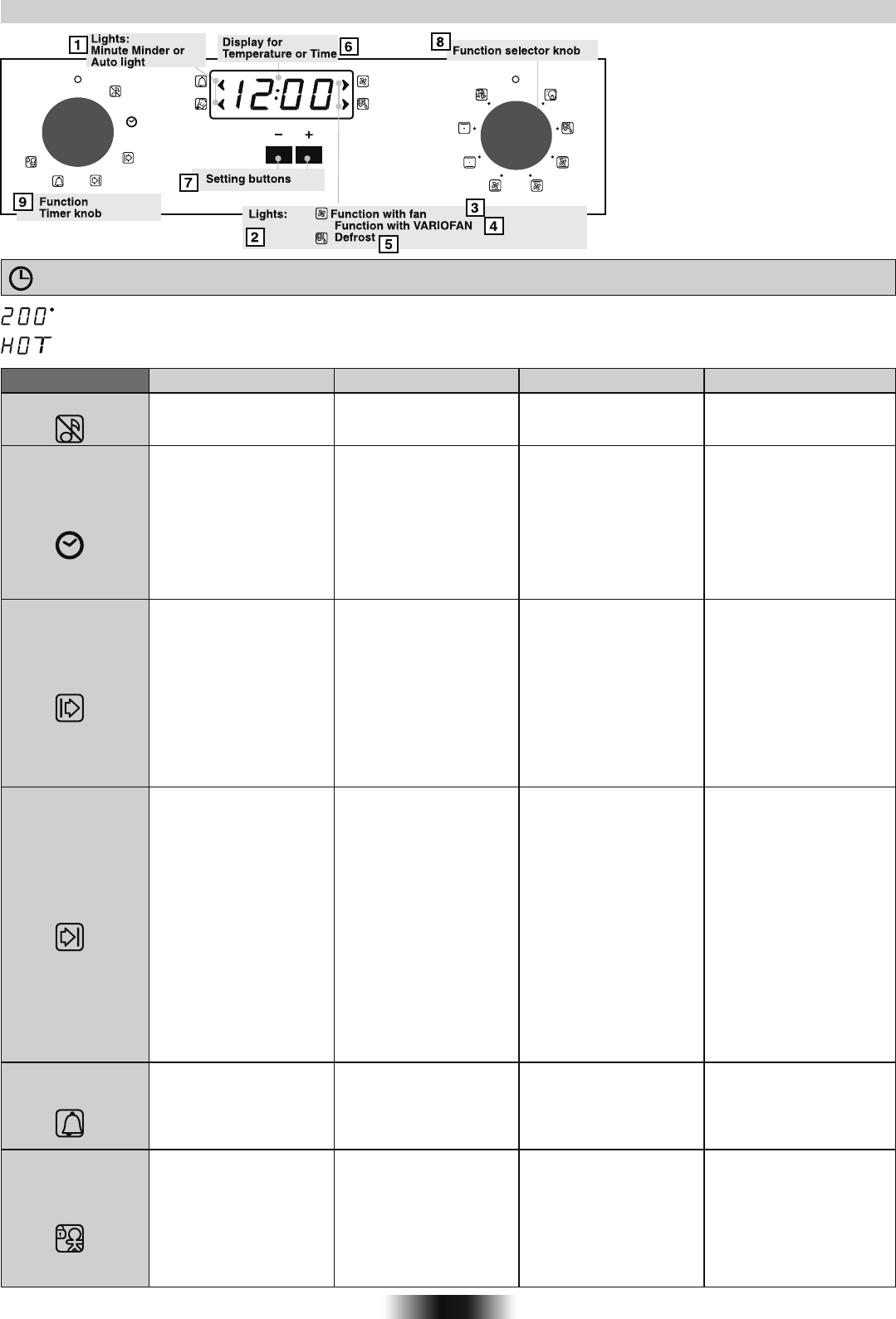
USE THE ELECTRONIC PROGRAMMER (Type A)
07 GB
The Led “°” of the temperature indicator pulsates until the pre-set temperature is not reached.
HOT : When a cooking program is finished, if the oven is still hot, « HOT » appears on the display, alternately with the time
displays, even if the two function selectors are switched on OFF.
FUNCTION HOW TO ACTIVATE IT?
HOW TO SWITCH IT OFF? WHAT IT DOES ? WHAT IT IS FOR ?
SILENCE MODE
SET THE TIME
COOKING TIME
DURATION
END OF
COOKING TIME
MINUTEMINDER
CHILD LOCK
• Rotate the left function
selector to the position
" Silence mode “
• Enables you to turn off the
sound of the minute
minder
• Rotate the function
selector to the position
OFF.
• To turn off the sound of the
minute minder
• Rotate the left function
selector to the position
“Set the time”.
• Use the buttons " + " or
" - " to set the time
• Enables you to set the
time which appears on the
display
• Rotate the function
selector to the position
OFF.
• To set the time
NB : Set the time when
you first install your oven
or just after a black out
(the clock is showing a
pulsating 12.00)
• Turn the right function
selector to a cooking
function
• Rotate the left function
selector to the position
"Cooking Time Duration"
• Set the time of cooking
by using buttons " + " and
" - "
• Lighting Auto appears
• It allows to preset the
cooking time required for
the recipe chosen.
• When the cooking time is
set, turn the function
selector toOFF to go back
to actual time.
• To view the cooking time
selected, turn the left
function selector to
Cooking Time duration.
•When the cooking time has
elapsed, the oven switch off
automatically and the alarm
rings for few seconds To stop
the cooking functions early,
turn the function control to
OFF or set the time on 00.00;
by rotating the function
selector to Cooking Time
Duration and by using the
buttons " + " and " - “
• For cooking the desired
recipes
• Turn the right function
selector to a cooking
function
• Rotate the left function
selector to the position
"End of cooking"
• Set the end time of
cooking by using buttons
" + " and " - "
• Lighting Auto appears
• It allows to preset the end
of cooking time you want.
• When the cooking time is
set, turn the function
selector to OFF to go back
to actual time.
• To view the cooking time
selected, turn the left
function selector to End of
cooking Time
• When the cooking time
has elapsed, the oven
switch off automatically.
• To stop the cooking
functions early, turn the
function control to OFF
• This function is used for
cooking we want to program
in advance. For example,
your recipe needs to be
cooked 45 min and to be
ready at 12.30pm ; simply
set the cooking time
duration on 45 min and the
end of cooking time on
12.30pm.
The cooking will start
automatically at 11.45
(12.30 minus 45 min) and
will continue until the preset
end of cooking time,
then the oven will switch
itself off automatically
• Turn the left function
selector to the position
Minute Minder
• Set the time of cooking
by using buttons “+”and “-”
• Sounds an alarm at a few
seconds at the end of the
set time
• Set the time on 00.00 by
turning the left function
selector to the position
Minute Minder, and using
the button " - “
Allow to use the oven as
alarm even if the oven is
switch off
• Turn the left function
selector to the position
Child lock.
Press the button " + "
during 3 seconds
• Child lock is available
when " STOP " appears
on display
• The oven cannot be used
• Turn back the left function
selector to Child lock and
press button " + " during 3
seconds
• Indication STOP
disappears
Useful especially when
children are at home
1. Minute Minder or Auto light
2. Lights
3. Function with fan
4. Function with VARIOFAN
5. Defrost
6. Display for Temperature or Time
7. Setting buttons
8. Function selector knob
9. Function Timer knob
* according to the model
The first operation to carry out after the oven has been installed or following the interruption of power supply
(this is recognizable the display pulsating and showing12:00) is setting the correct time.
WARNING !
Scarica il manuale in italiano (PDF, 1.77 MB)
(Rispetta l’ambiente e stampa questo manuale solo se è veramente necessario)

Loading…

Valutazione

Facci sapere che cosa pensi della Hoover HOC 709 X Forno valutando il prodotto. Vuoi condividere la tua esperienze con questo prodotto o porre una domanda? Ti preghiamo di lasciare un commento al fondo della pagina.
Sei soddisfatto di Hoover HOC 709 X Forno?
No
Valuta per primo questo prodotto
0 voti

Partecipa alla conversazione su questo prodotto

Qui puoi condividere cosa pensi di Hoover HOC 709 X Forno. Se hai una domanda, leggi prima attentamente il manuale. La richiesta di un manuale può essere effettuata utilizzando il nostro modulo di contatto.

Andrea 17-07-2020
Salve riesco ad accendere il display del forno ma poi non riesco a ad attivarlo per la cottura cosa devo fare?

rispondi | È stato utile (0)

Maggiori informazioni su questo manuale

Comprendiamo che sia bello avere un manuale cartaceo per i tuoi Hoover HOC 709 X Forno. Puoi sempre scaricare il manuale dal nostro sito web e stamparlo tu stesso. Se desideri avere un manuale originale, ti consigliamo di contattare Hoover. Potrebbero essere in grado di fornire un manuale originale. Stai cercando il manuale del tuo Hoover HOC 709 X Forno in un'altra lingua? Scegli la tua lingua preferita sulla nostra home page e cerca il numero del modello per vedere se è disponibile.

Specifiche

Marca Hoover
Modello HOC 709 X
Categoria Forni
Tipo di file PDF
Dimensione del file 1.77 MB

Tutti i manuali per Hoover Forni
Altri manuali di Forni

Domande frequenti su Hoover HOC 709 X Forno

Il nostro team di supporto cerca informazioni utili sul prodotto e risposte alle domande più frequenti. Se trovi un’inesattezza nelle nostre domande frequenti, ti preghiamo di farcelo sapere utilizzando il nostro modulo di contatto.

Il mio forno non si scalda abbastanza, cosa devo fare? Verificato

Il termostato fa sì che il forno si scaldi fino alla temperatura desiderata. Il termostato potrebbe essere difettoso e andrebbe sostituito. In caso di dubbi, si prega di contattare il produttore.

È stato utile (3193) Per saperne di più

Che cos’è la pirolisi? Verificato

Alcuni forni sono dotati di una funzione di pirolisi. Questo sistema di pulizia brucia lo sporco e i grassi nel forno grazie alle alte temperature. Dopo la pirolisi, tutto lo sporco si trasforma in polvere e può essere rimosso facilmente. In caso il forno disponga della funzione di pirolisi, si consiglia di utilizzarla 3/4 volte l’anno, per mantenere il forno pulito.

È stato utile (3185) Per saperne di più

Quando utilizzo il forno ci sono spesso dei resti che cadono sul fondo, provocando del fumo. Come posso evitare che questo accada? Verificato

Molti forni sono dotati di una griglia e di una teglia. Quando si preparano degli alimenti sulla griglia, la teglia può essere posizionata sotto di essa per evitare che i resti cadano sul fondo e provochino del fumo.

È stato utile (814) Per saperne di più

Perché si accumula del fumo nel forno mentre si riscalda? Verificato

Probabilmente sono rimasti dei resti di cibo nel forno. In particolare i resti di cibi unti possono produrre fumo quando vengono riscaldati. Si consiglia di pulire accuratamente il forno.

È stato utile (805) Per saperne di più

Si possono preparare più cose contemporaneamente utilizzando più teglie? Verificato

Sì, tecnicamente sì. Tuttavia, dipende da cosa bisogna preparare e se è necessario regolare il tempo di cottura o spostare le teglie durante la cottura.

È stato utile (803) Per saperne di più
Manuale Hoover HOC 709 X Forno

Prodotti correlati

Categorie correlate

×
Download