Manuale Candy CFSX516/4U Forno

Hai bisogno di un manuale per il tuo Candy CFSX516/4U Forno? Di seguito è possibile visualizzare e scaricare gratuitamente il manuale in PDF in italiano. Questo prodotto attualmente ha 5 domande frequenti, 0 commenti e ha 0 voti. Se questo non è il manuale che desideri, contattaci.

Il tuo prodotto è difettoso e il manuale non fornisce alcuna soluzione? Rivolgiti a un Repair Café per il servizio di riparazione gratuita.

Manuale

Loading…
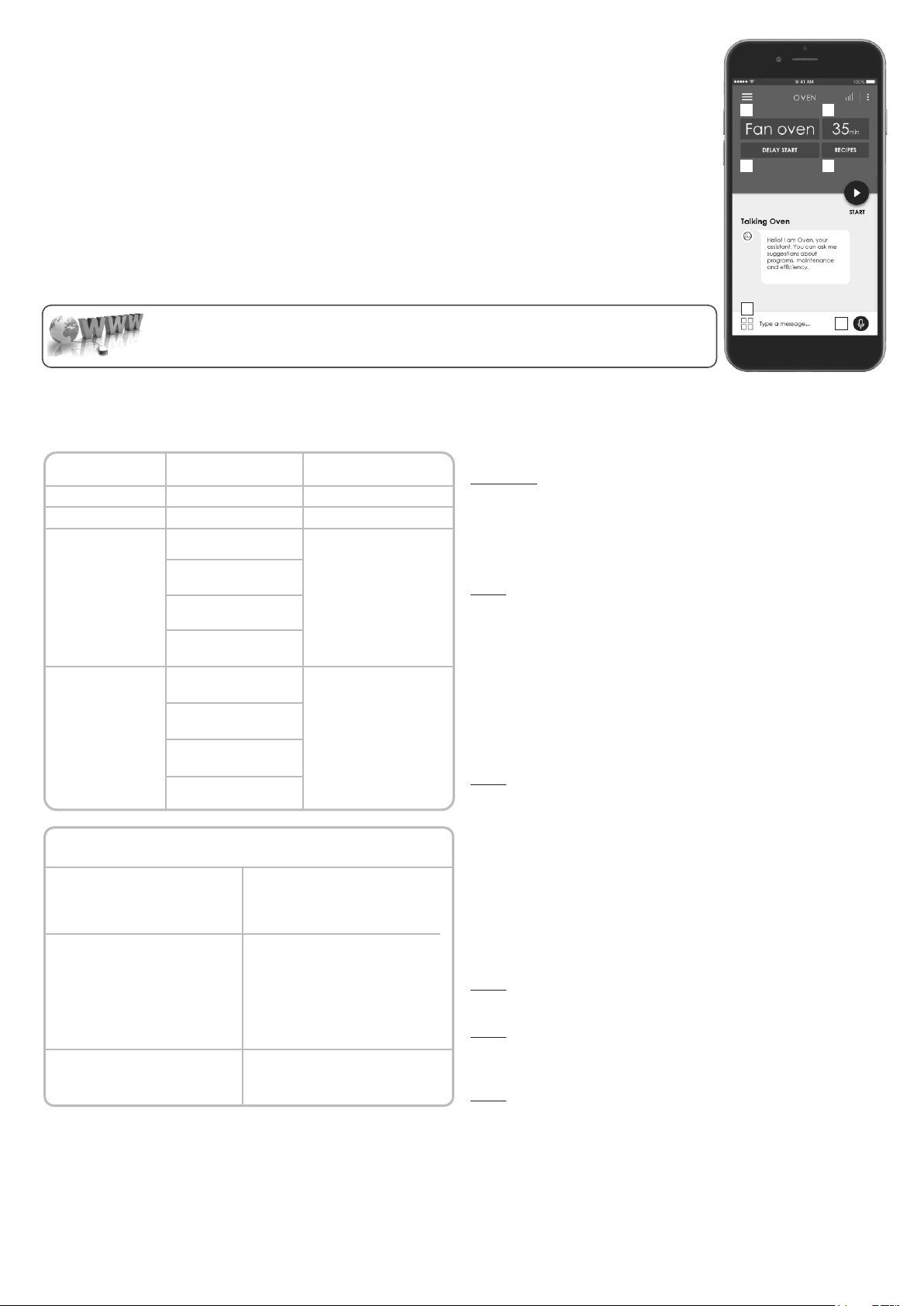
1. Program selection / 2. Program duration / 3. Cooking start setting / 4- Dedicated recipes selection / 5. Offline and vocal assistant /
6. Tips, suggestions and online user manual
1 2
3 4
6
5
WIFI FUNCTION
For all the details related to the link between app and product, refer to the Quick Guide.
The Quick Guide is available on: go.candy-group.com/candy-ov
Wi Fi has two different positions on the cooking selector:
• Wi Fi on: Wi Fi is switched on only if the oven is already enrolled to your device. In this position the oven will be only controlled by
remote.
• Wi Fi reset: After leaving the selector on Wi Fi reset for 30, Bluetooth will switch on and you will be able to enroll the oven to your
device within 5’.
If the enrollment is successful, the oven will be controlled by remote and the Wi Fi icon will switch on. If the enrollment is unsuccessful,
Wi Fi will switch off and the oven will be reset.
To proceed with a new enrollment the cooking program selector has to be turned out from Wi Fi reset position and moved again on it.
Note: Install the App on your device before starting enrolling
Note: The device where the App is installed must have Bluetooth activated
Note: For both Wi Fi positions, the touch buttons do not work.
Note: It is important to establish a good Wi-Fi signal strength between the home router and the appliance. When the oven is trying to
connect to router the icon will blink 3” on and 1” off, when it is already connected the icon will switch on.
EN 08
CANDY SIMPLY-FI:
For detailed information about HOW TO CONNECT your simply-Fi appliance and HOW TO USE it at its
best, go to http://www.candysimplyfi.com
WIRELESS PARAMETERS
Bluetooth v4.2
2,412 GHz. – 2,484 GHz
Basic data rate:
RF Transmit Power (Typ):
+4 dBm
Enhanced data rate:
RF Transmit Power (Typ):
+2 dBm
BLE:
RF Transmit Power (Typ):
+7.5 dBm
802.11 b/g/n
2,412 GHz. – 2,484 GHz
802.11b. DSSS 1 Mbps=
+19.5 dBm
802.11b. CCK 11 Mbps=
+18.5 dBm
802.11g. OFDM 54 Mbps=
+18.5 dBm
802.11n. MCS7=
+14 dBm
802.11b =1024 bytes,
-80 dBm
802.11g =1024 bytes,
-70 dBm
802.11n =1024 bytes,
-65 dBm
802.11n HT40 =1024 bytes,
-65 dBm
Wireless Standart
Frequency Range
Max Transmit Power
Minimum Receiving
Sensivity
Parameter
Specifications
(Wi-Fi)
Specifications
(Bluetooth)
Basic data rate:
Sensivity@ 0.1% BER:
-98 dBm
Enhanced data rate:
Sensivity@ 001% BER:
-98 dBm
BLE:
Sensivity@ 0.1% BER:
-98 dBm
Product information for networked equipment
power consumption of the product in
networked standby if all wired network
ports are connected and all wireless
network ports are activated:
2,0 W
How to activate wireless network port:
Starting from an oven that is not
enrolled, putting the right knob on the
Res e t po s ition . Wi fi m o d u le i s
switched on after 30".
If oven is enrolled with WiFi off, putting
the right knob on WiFi position the WiFi
module is switched on.
How to deactivate wireless network
port:
If oven is enrolled, putting the right
knob on Reset position the WiFi
module is switched off.
Quick Guide Candy OVEN - Enrollment on App
Procedure for devices with Bluetooth 4.0 (or higher)
IMPORTANT
This quick guide illustrates the steps to follow to enroll your appliance on the
App Candy simply-Fi, using a device with Bluetooth 4.0 (or higher)
technology. In this case, the procedure is simplified and faster (Easy
Enrollment). If you are using a device without Bluetooth technology (or less
than 4.0), please follow the instructions described on the other side of this
guide.
STEP 1
Mark down the appliance Serial Number.
Mark down the Wi-Fi Name and Password (WPA/WEP Key) which are
normally placed on the back of your Wi-Fi router.NOTES
The frequency of the home Wi-Fi network has to be set on the 2.4 GHz
band. You cannot configure the appliance if your home network is set to the 5
GHz band.
If you are having trouble locating the WPA/WEP Password, please contact
your Internet Provider.
Please make sure your smartphone is connected to the same Wi-Fi
network and has the Bluetooth enabled within the “Settings”. Refer to the
manual for more details.
STEP 2
Download the Candy simply-Fi App from the Store.
Open the Candy simply-Fi App and create your user profile by taping on
“Register. Accept the privacy policy and fill in the required fields.
NOTES
The App is available for Android (version 4.4 or higher) and iOS (version 8.0
or higher) devices.
If you already have a Candy simply-Fi user profile, you can login using your
credentials.
STEP 3
In the homepage, tap on the icon with the three bars on the top left to enter
your profile, then tap on “REGISTER NEW APPLIANCE” and select the name
of the product that you want to enroll.
STEP 4
Insert the purchase date of your appliance (DD/MM/YYYY), then tap on
“Proceed”.
STEP 5
Insert the 16 digits of the serial number or scan the QR code on the
appliance. Tap on “Next. Check data correctness of the data and tap on
“Confirm”. Once the system has recognized the product, tap on “Next.
STEP 6
On the appliance:
1) Turn the knob to the WI-FI RESET program and wait 30 seconds.
2) When the Wi-Fi indicator starts blinking quickly, Bluetooth will come on for
5' and you can proceed with enrollment within 5 minutes.
In App:
Tap on “Confirm”. Wait for APP to connect to the appliance.
NOTES
In case of any issue, tap “Retry, making sure you have enabled Bluetooth
Scarica il manuale in italiano (PDF, 21.44 MB)
(Rispetta l’ambiente e stampa questo manuale solo se è veramente necessario)

Loading…

Valutazione

Facci sapere che cosa pensi della Candy CFSX516/4U Forno valutando il prodotto. Vuoi condividere la tua esperienze con questo prodotto o porre una domanda? Ti preghiamo di lasciare un commento al fondo della pagina.
Sei soddisfatto di Candy CFSX516/4U Forno?
No
Valuta per primo questo prodotto
0 voti

Partecipa alla conversazione su questo prodotto

Qui puoi condividere cosa pensi di Candy CFSX516/4U Forno. Se hai una domanda, leggi prima attentamente il manuale. La richiesta di un manuale può essere effettuata utilizzando il nostro modulo di contatto.

Maggiori informazioni su questo manuale

Comprendiamo che sia bello avere un manuale cartaceo per i tuoi Candy CFSX516/4U Forno. Puoi sempre scaricare il manuale dal nostro sito web e stamparlo tu stesso. Se desideri avere un manuale originale, ti consigliamo di contattare Candy. Potrebbero essere in grado di fornire un manuale originale. Stai cercando il manuale del tuo Candy CFSX516/4U Forno in un'altra lingua? Scegli la tua lingua preferita sulla nostra home page e cerca il numero del modello per vedere se è disponibile.

Specifiche

Marca Candy
Modello CFSX516/4U
Categoria Forni
Tipo di file PDF
Dimensione del file 21.44 MB

Tutti i manuali per Candy Forni
Altri manuali di Forni

Domande frequenti su Candy CFSX516/4U Forno

Il nostro team di supporto cerca informazioni utili sul prodotto e risposte alle domande più frequenti. Se trovi un’inesattezza nelle nostre domande frequenti, ti preghiamo di farcelo sapere utilizzando il nostro modulo di contatto.

Il mio forno non si scalda abbastanza, cosa devo fare? Verificato

Il termostato fa sì che il forno si scaldi fino alla temperatura desiderata. Il termostato potrebbe essere difettoso e andrebbe sostituito. In caso di dubbi, si prega di contattare il produttore.

È stato utile (3194) Per saperne di più

Che cos’è la pirolisi? Verificato

Alcuni forni sono dotati di una funzione di pirolisi. Questo sistema di pulizia brucia lo sporco e i grassi nel forno grazie alle alte temperature. Dopo la pirolisi, tutto lo sporco si trasforma in polvere e può essere rimosso facilmente. In caso il forno disponga della funzione di pirolisi, si consiglia di utilizzarla 3/4 volte l’anno, per mantenere il forno pulito.

È stato utile (3188) Per saperne di più

Quando utilizzo il forno ci sono spesso dei resti che cadono sul fondo, provocando del fumo. Come posso evitare che questo accada? Verificato

Molti forni sono dotati di una griglia e di una teglia. Quando si preparano degli alimenti sulla griglia, la teglia può essere posizionata sotto di essa per evitare che i resti cadano sul fondo e provochino del fumo.

È stato utile (815) Per saperne di più

Perché si accumula del fumo nel forno mentre si riscalda? Verificato

Probabilmente sono rimasti dei resti di cibo nel forno. In particolare i resti di cibi unti possono produrre fumo quando vengono riscaldati. Si consiglia di pulire accuratamente il forno.

È stato utile (807) Per saperne di più

Si possono preparare più cose contemporaneamente utilizzando più teglie? Verificato

Sì, tecnicamente sì. Tuttavia, dipende da cosa bisogna preparare e se è necessario regolare il tempo di cottura o spostare le teglie durante la cottura.

È stato utile (804) Per saperne di più
Manuale Candy CFSX516/4U Forno

Prodotti correlati

Categorie correlate

×
Download