Manuale Timex TW5M23000GP Orologio da polso

Hai bisogno di un manuale per il tuo Timex TW5M23000GP Orologio da polso? Di seguito è possibile visualizzare e scaricare gratuitamente il manuale in PDF in italiano. Questo prodotto attualmente ha 6 domande frequenti, 1 commento e ha 1 voto con una valutazione media del prodotto di 0/100. Se questo non è il manuale che desideri, contattaci.

Il tuo prodotto è difettoso e il manuale non fornisce alcuna soluzione? Rivolgiti a un Repair Café per il servizio di riparazione gratuita.

Manuale

Loading…
1
ENGLISH 02W-095000
EXTENDED WARRANTY
Available in U.S. only. Extend your warranty for an additional 4 years from
date of purchase for $5. You can pay with AMEX, Discover, Visa or MasterCard
by calling 1 800-448-4639 during normal business hours. Payment must be
made within 30 days of purchase. Name, address, telephone number, purchase
date, and 5-digit model number required. You can also mail a check for $5 to:
Timex Extended Warranty, P.O. Box 1676, Dept. EF, Little Rock, AR 72203.
Please read instructions carefully to understand how to operate your Timex
®
watch. Your model may not have all of the features described in this
booklet.
FEATURES AND BASIC OPERATION
1. Date with MM-DD format (month/day)
2. 24-Hour Stopwatch with Split time
3. 3 Alarms (Daily or Weekly) and Hourly Chime
4. 24-Hour Countdown Timer
5. Dual Time (Digital 2nd Time Zone)
6. INDIGLO
®
night-light
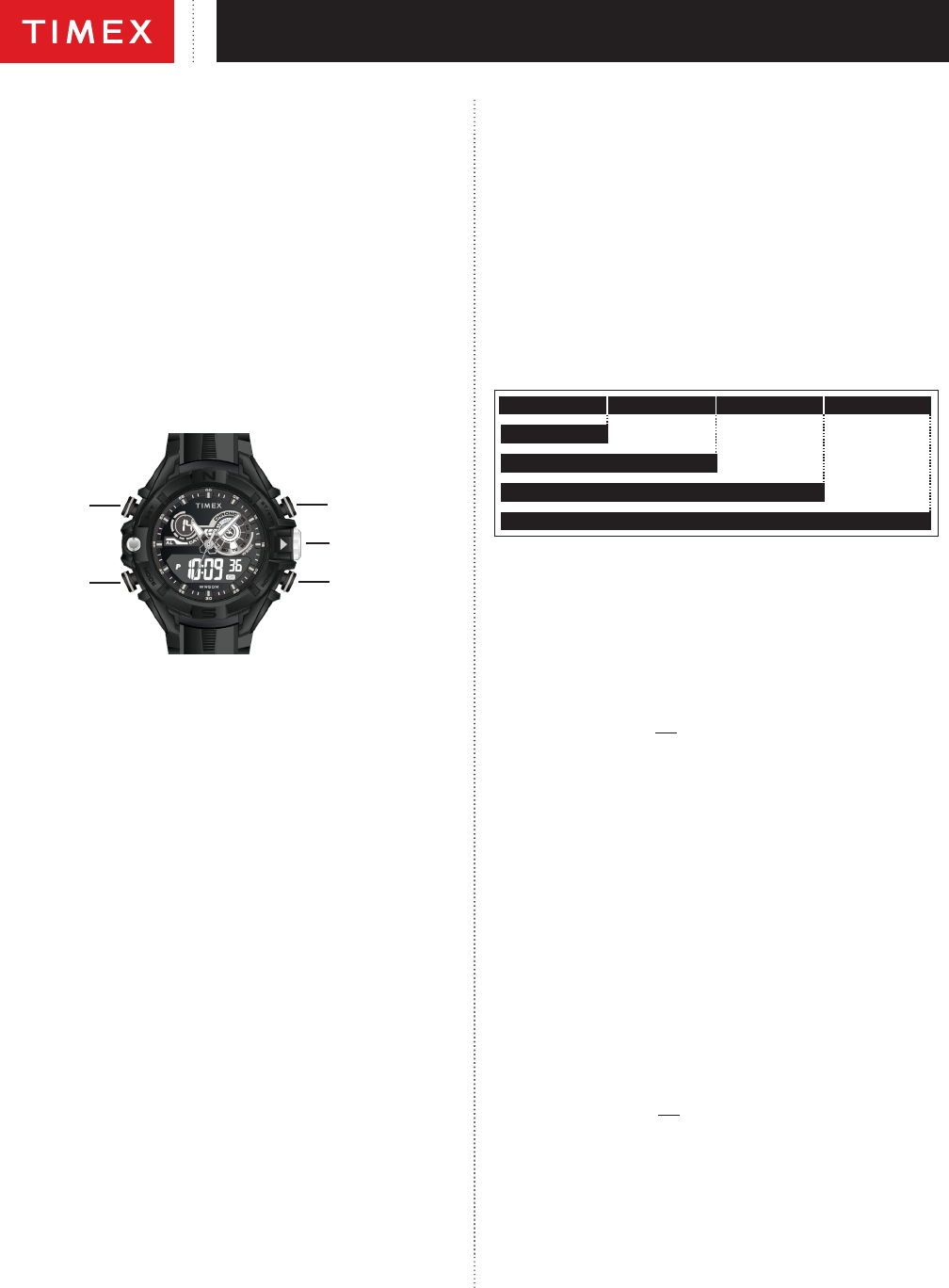
SET
(To save
changes and
exit setting)
MODE
(Proceed to
next step)
CROWN
ST/STP
(Increase value. Hold
to increase rapidly)
INDIGLO
®
Button
Button functions shown with setting functions in parentheses
TIME
To set time and date
1. To start your watch remove the plastic guard from under the crown, then
press the crown in against the case. The second hand will begin advancing
in one-second intervals.
2. Pull the crown out all the way and turn to the correct analog time. Push the
crown in to restart the analog watch.
3. From Time of Day mode in the digital watch, press and hold SET. The
Seconds can be seen ashing.
4. Press ST/STP to set Seconds to zero adding one minute if seconds are
“30” or greater.
5. Press MODE to set Hours, as indicated by its ashing. Press ST/STP to
advance the Hours setting. Press and hold to increment quickly.
6. Press MODE to set Minutes, as indicated by its ashing. Press ST/STP to
advance the Minutes setting. Press and hold to increment quickly.
7. Press MODE to set the Month number, as indicated by its ashing. Press
ST/STP to advance the Month setting. Press and hold to increment
quickly.
8. Press MODE to set the Date, as indicated by its ashing. Press ST/STP to
advance the Day setting. Press and hold to increment quickly.
9. Press MODE to set the Day, as indicated by the ashing segment. Press
ST/STP to advance the Day setting. Press and hold to increment quickly.
10. Press MODE to set the Time Format, as indicated by its ashing (12H or
24H). Press ST/STP to toggle the setting.
11. Press SET to exit Time Set.
Note: 12-Hour time has no indicator in the morning and a “PM” indicator after
Noon.
Note: To peek at the Month/Date setting from Time mode, press and hold
ST/STP.
STOPWATCH
Use this function for timing events.
1. Press MODE until “SP” appears.
2. Press ST/STP to start timing.
3. With the stopwatch running, press SET to record a Split time. The
stopwatch will continue timing in the background.
4. Press SET to release the display and show the current running
stopwatch time.
5. Press SET to record another Split time.
6. Press ST/STP to pause the timing.
7. Either press ST/STP to resume timing, or press SET to reset the Stopwatch
to zero.
Note: If the Stopwatch was paused when the display was showing a Split time,
the rst press of SET will show the nal recorded time, and the second press
will reset the Stopwatch to zero.
LAP 1 = 7.11 LAP 2 = 7.50
SPLIT 2 = 15.01
LAP 3 = 7.08
SPLIT 3 = 22.09
LAP 4 = 7.30
SPLIT 4 = 29.39
SPLIT 1 = 7.11
ALARM
To turn on/o or to set one of the 3 Daily alarms, or to turn on/o an hourly
chime.
1. Press MODE until “A1” (Alarm 1) appears.
2. Press SET to access “A2” (Alarm 2), “A3” (Alarm 3), “CH” (Hourly Chime),
or “BP” (Button Beep)
3. Press ST/STP to toggle the Selected Alarm (AL graphic) on/o, to toggle
the Hourly Chime (CH graphic in a dark box) on/o, or to toggle Button
Beep ON/OFF.
4. To Set an Alarm, press and hold SET. The Alarm eld ashes.
5. Press ST/STP to select one of the 3 alarms to set.
6. Press MODE to go the Hours setting as indicated by its ashing
7. Press ST/STP to advance the Hours setting. Press and hold to increment
quickly.
Note: The Hours will be presented in the same format (12- or 24-hour time) as
the time setting.
8. Press MODE to set the Minutes as indicated by its ashing. Press ST/STP
to advance the Minutes setting. Press and hold to increment quickly.
9. Press MODE to select the applicable Time Zone, as indicated by its
ashing (T1 or T2). Press ST/STP to toggle the setting.
10. Press MODE to select the alarm Frequency, as indicated by its ashing
“DA” (Daily) or “WE“ (Weekly). Press ST/STP to toggle the setting.
11. Press MODE to turn the alarm “ON” or “OFF”. Press ST/STP to toggle
the setting.
12. Press SET to exit the Alarm Set.
13. When the alarm sounds, press ANY button to silence the alert, or it will
stop automatically in about 20 seconds.
COUNTOWN TIMER
Use this function for timing events or tasks that have a dened end.
1. Press MODE until “TR” appears.
2. To Set the Timer, press and hold SET. The Hour digit ashes.
3. Press ST/STP to advance the Hours setting. Press and hold to increment
quickly.
4. Press MODE to set the Minutes as indicated by its ashing. Press ST/STP
to advance the Minutes setting. Press and hold to increment quickly.
5. Press MODE to set the Seconds as indicated by its ashing. Press
ST/STP to advance the Minutes setting. Press and hold to increment
quickly.
Scarica il manuale in italiano (PDF, 0.71 MB)
(Rispetta l’ambiente e stampa questo manuale solo se è veramente necessario)

Loading…

Valutazione

Facci sapere che cosa pensi della Timex TW5M23000GP Orologio da polso valutando il prodotto. Vuoi condividere la tua esperienze con questo prodotto o porre una domanda? Ti preghiamo di lasciare un commento al fondo della pagina.
Sei soddisfatto di Timex TW5M23000GP Orologio da polso?
No
0%
100%
1 vota

Partecipa alla conversazione su questo prodotto

Qui puoi condividere cosa pensi di Timex TW5M23000GP Orologio da polso. Se hai una domanda, leggi prima attentamente il manuale. La richiesta di un manuale può essere effettuata utilizzando il nostro modulo di contatto.

robert belairt 24-03-2025
Alla ricerca di Bracciale TW5M23000 TW5M23000

rispondi | È stato utile (0) (Tradotto da Google)

Maggiori informazioni su questo manuale

Comprendiamo che sia bello avere un manuale cartaceo per i tuoi Timex TW5M23000GP Orologio da polso. Puoi sempre scaricare il manuale dal nostro sito web e stamparlo tu stesso. Se desideri avere un manuale originale, ti consigliamo di contattare Timex. Potrebbero essere in grado di fornire un manuale originale. Stai cercando il manuale del tuo Timex TW5M23000GP Orologio da polso in un'altra lingua? Scegli la tua lingua preferita sulla nostra home page e cerca il numero del modello per vedere se è disponibile.

Specifiche

Marca Timex
Modello TW5M23000GP
Categoria Orologi da polso
Tipo di file PDF
Dimensione del file 0.71 MB

Tutti i manuali per Timex Orologi da polso
Altri manuali di Orologi da polso

Domande frequenti su Timex TW5M23000GP Orologio da polso

Il nostro team di supporto cerca informazioni utili sul prodotto e risposte alle domande più frequenti. Se trovi un’inesattezza nelle nostre domande frequenti, ti preghiamo di farcelo sapere utilizzando il nostro modulo di contatto.

Una pila del dispositivo si è ossidata, posso utilizzarlo ancora? Verificato

Sì, il dispositivo si può utilizzare ancora. Prima di tutto, rimuovere la pila ossidata. Non farlo mai a mani nude. Pulire quindi il vano della batteria con un cotton fioc bagnato di aceto o succo di limone. Lasciar asciugare e inserire le nuove pile.

È stato utile (933) Per saperne di più

Il mio orologio meccanico va veloce, cosa posso fare? Verificato

Questo problema potrebbe essere causato dall'esposizione a un campo magnetico. Si può risolvere con un processo di smagnetizzazione eseguito da un orologiaio professionista.

È stato utile (872) Per saperne di più

Cosa significano AM e PM? Verificato

AM significa Ante Meridiem e indica le ore prima di mezzogiorno. PM significa Post Meridiem e indica le ore dopo mezzogiorno.

È stato utile (748) Per saperne di più

Cos’è un “cronografo”? Verificato

Un “cronografo” è letteralmente uno “scrittore del tempo”. Questo termine è utilizzato per descrivere gli orologi che indicano l’ora ma che possono anche misurare un determinato periodo di tempo, come un cronometro.

È stato utile (654) Per saperne di più

Che cosa è il GMT? Verificato

GMT sta per Tempo medio di Greenwich (a volte chiamato UTC, tempo coordinato universale). È l’ora alla longitudine 0 che passa da Greenwich, vicino a Londra.

È stato utile (494) Per saperne di più

Che cos’è il movimento al quarzo? Verificato

Gli orologi al quarzo sono alimentati a batteria. Questa trasmette corrente ai cristalli di quarzo che emettono delle vibrazioni responsabili del movimento. Dato che le vibrazioni hanno una frequenza fissa, gli orologi al quarzo sono estremamente precisi.

È stato utile (482) Per saperne di più
Manuale Timex TW5M23000GP Orologio da polso

Prodotti correlati

Categorie correlate

×
Download