ROC5209
00131867
Operating Instructions .......................................................... 01
Mode d‘emploi ....................................................................... 05
Bedienungsanleitung ............................................................. 09
Istruzioni per l‘uso ................................................................. 13
Instrucciones de uso ............................................................. 17
Gebruiksaanwijzing ............................................................... 21
Manual de instruções ............................................................ 25
Οδηγίες χρήσης..................................................................... 29
Руководство по эксплуатации ......................................... 33
Instrukcja obsługi ................................................................... 37
Návod k použití ...................................................................... 41
Használati útmutató .............................................................. 45
Bruksanvisning ....................................................................... 49
Brukerveiledning .................................................................... 53
Brugsanvisning ....................................................................... 57
Pistokelaturi ............................................................................ 61
1
GB
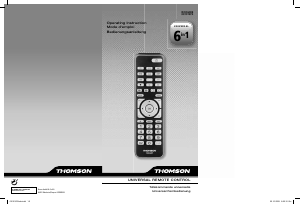
This universal remote control ROC5209 (5 in 1) is compatible with the majority of television
sets, DVD players and video recorders, as well as digital boxes such as satellite or cable
receivers, DVBT receivers (Digital Video Broadcast Terrestrial), ADSL decoders, and so on.
The ROC5209 comes with a convenient base/stand that you can place the remote in when
you’re not using it. The base/stand also has a Find/Page feature, which lets you quickly fi nd
the remote if you’ve misplaced it. You simply press the Page key on the base and the remote
sounds with a tone, making it easy to locate.
This remote control was programmed in the factory, so that you can use it to control most
of the sets of the THOMSON group’s make. For this reason, we recommend that prior to
attempting to programme the remote control, you try it out by means of one of the methods
described in this user manual. However, fi rst, install 2 AAA batteries in both equipments: the
remote control and the base.
Please keep this guide along with the code list (provided separately), so that you can subse-
quently programme your remote control for use with other sets.
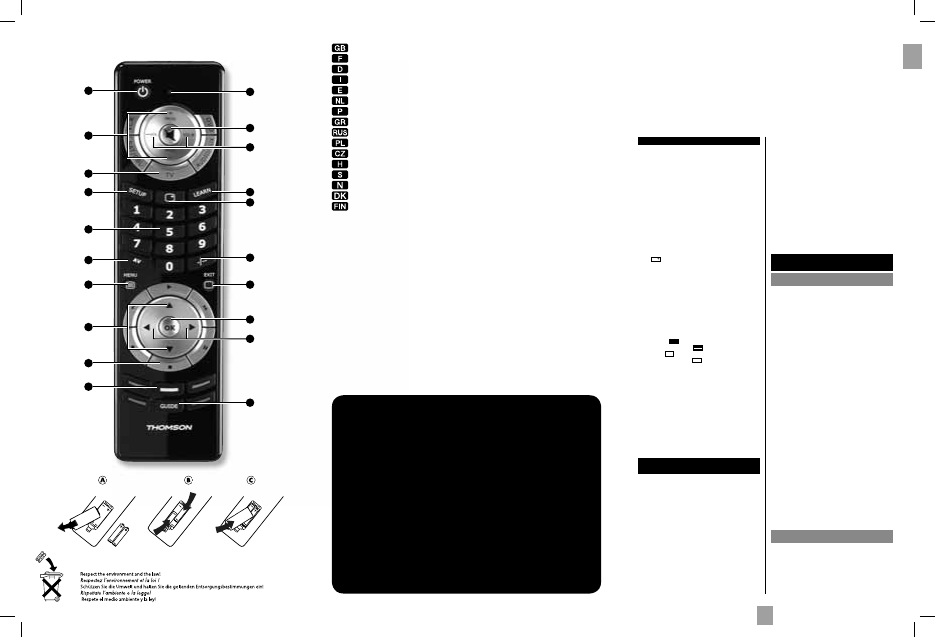
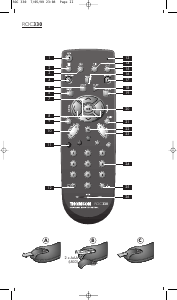
1 G : On/Standby or Standby only, depending on
the equipment being used.
2 Indicator lamp: The red indicator lights up when
any key is pressed.
3 Prog+/Prog-: Channel Up and Channel Down
buttons.
4 H (Mute): Switches the selected appliance sound
off.
5 Mode keys: Select the device to control (TV, DVD,
…)
6 Vol+/Vol-: Increases (+) or decreases (-) the
volume of the selected device.
7 Setup: Allows you to program your remote
before the fi rst use. It also allows you to access to
secondary functions of certain A/V appliances
(Shift). Press and release the "Setup" key
followed by the function key you want.
8 : Displays information of the selected
appliance.
9 Numeric keys 0-9: These keys have the same
functions as those of your original remote and
are also used to enter the codes for different
products.
10 Learn: Used for the learning codes procedure
(key copying) (see page x).
11 AV: For selecting an external source (SCART,
HDMI, ...)..
12 -/--: In connection with the numeric keys, this
button allows you, with some equipment, to select
directly channels with 2 digits.
13 Menu / : Turns on the menu of the selected
product / Setup + : Teletext On.
14 Exit / : Turn off the menu of the selected
product / Setup + : Teletext Off.
15 C/D: Allow you to navigate the menus verticaly.
16 A/B : Allow you to navigate the menus
horizontally.
17 B (Play): Play a DVD disc (DVD, VCR, ...).
F (FF): Fast forward (DVD, VCR, ...).
E (RW): Goes backward (DVD, VCR, ...).
J (Pause):
Suspends play and stops on an image
K (Stop): Stop the disc (DVD, VCR, ...).
I
(Record): To record, press the RECORD key twice.
18 OK: Confi rms a selection.
19 Coloured keys: Can be used to select categories
when teletext is activated, and specifi c functions
depending on the make.
20 Guide: Electronic Program Guide.
The keys
Testing the remote control before
you programme it
1. Turn on the product you want to control.
2. Press the Mode key that corresponds to the type
of product you want to control: TV: television set,
DVD: DVD player, VCR: video recorder, SAT/
CAB: satellite or cable receiver, AUDIO/AUX:
audio equipment or any other equipment.
3. Direct the remote control towards your equipment
and try to switch it off by simply pressing the key G.
If the device does not turn off, you must program the
remote control using one of the methods A, B, C or
D described hereafter.
Note 1: Except for the TV key, the DVD, VCR,
SAT/CAB and AUDIO/AUX mode keys can be
programmed to control a device other than that
indicated on the key. It is therefore possible, for
example, to allocate SAT mode to the DVD key. You
must enter the code corresponding to the manufacturer
and the device by using one of the methods indicated
in this manual.
However, method D (automatic search for a code)
will greatly simplify the task for you. In this case it
is only necessary to enter a code from the list that
corresponds to the type of device, for example: 0603
for a Thomson satellite receiver) and then to run the
automatic search procedure. The remote control will
then test all the codes automatically until it fi nds those
that control the receiver.
Note 2: To control 2 devices of the same type and the
same brand (2 Thomson VCRs, 2 Thomson satellite
receivers, ...) ensure fi rst that these two devices are not
set to react to the same sub code, they will require one
sub code for one and a different sub code for the other
(i.e., codes A and B with Thomson devices). Once you
have checked this, successively program 2 separate
mode keys using method D.
Programming
the remote control
Method A – Fast programming
with 1-digit subcode
Before you start programming, you must fi nd the
subcode of the set to be controlled. Entering a subcode
lets the remote control test a predefi ned list of codes.
Refer to the list provided with these instructions, page
I of the subcodes.
1. Switch on the set you want to control.
2. Hold down the SETUP key until the red indicator
lamp blinks and then remains lit (the indicator light
remains on for a few seconds to give you the time to
proceed with the following steps. The indicator lamp
fl ashes to signal that this time is almost up, and then
goes off).
3. Press the key that corresponds to the type of
equipment you want to control:
TV: television set, DVD: DVD player, VCR: Video
recorder, SAT/CABLE: satellite receiver, cable,
DVBT, ADSL, AUDIO/AUX: audio equipment and
any other appliance.
4. While the indicator is lit, type in the subcode
(example: 1 for THOMSON).
5. Direct the remote control towards the set and try to
switch it off by pressing the key G.
6. If the set you want to control switches off, press OK
to memorise the code.
7. Should the set not switch off, press key G repeatedly,
until the set switches off. Between two key presses,
leave enough time for the red indicator lamp to light
up again (about 1 second). Proceeding this way will
enable you to see whether the set responds or not.
8. Immediately upon the switching-off of the set to be
controlled, press OK to store the code.
Check of the programming:
In principle, your set is ready for receiving the remote
control commands.
Check your remote control for proper functioning by
performing the test described on page 2.
Method B – 4-digit codes
programming
Before you start programming, you must fi nd the code
of the set to be controlled.
Refer to the list provided with these instructions, page
II of the codes.
1. Switch on the set you want to control.
2. Hold down the SETUP key until the red indicator
lamp blinks and then remains lit (the indicator light
1
3
15
5
7
9
11
13
17
19
2
4
18
6
16
10
8
12
14
20
Characteristics - Caractéristiques - Eigenschaften - Caratteristiche
Características - Eigenschappen - Características - χαρακτηριστικά
Технические характеристики - Dane techniczne - Technické údaje
Karakterisztika - Data - Karakteristikker - Data - Ominaisuudet
Dimensions - Dimensions - Abmessungen - Dimensioni - Dimensiones
- Afmetingen - Dimensões -
Διαστάσεις - размеры -
Wymiary - Rozměry
- Méret
- Mått - Dimensjoner - Mål - Mitat
= 190 x 52 x 19 mm / 73 x 77 x 81 mm
Weight = 90/110 grammes
Poids = 90/110 grammes
Gewicht = 90/110 Gramm
Peso = 90/110 grammi
Peso = 90/110 gramos
Gewicht = 90/110 gram
Peso = 90/110 gramas
Βάρoς = 90/110 γραμμάρια
вес = 90/110 грамм
Ciężar = 90/110 g
Hmotnost = 90/110 g
Súly = 90/110 gramm
Vikt = 90/110 gram
Vekt = 90/110 gram
Vægt = 90/110 gram
Paino = 90/110 grammaa
AAA
00131867bda.indd 4-Abs1:100131867bda.indd 4-Abs1:1 22.09.2009 10:02:35 Uhr22.09.2009 10:02:35 Uhr


Partecipa alla conversazione su questo prodotto
Qui puoi condividere cosa pensi di Thomson ROC5209 Telecomando. Se hai una domanda, leggi prima attentamente il manuale. La richiesta di un manuale può essere effettuata utilizzando il nostro modulo di contatto.