Manuale Samsung HW-Q700D Sistema home theater

Hai bisogno di un manuale per il tuo Samsung HW-Q700D Sistema home theater? Di seguito è possibile visualizzare e scaricare gratuitamente il manuale in PDF in italiano. Questo prodotto attualmente ha 0 domande frequenti, 0 commenti e ha 0 voti. Se questo non è il manuale che desideri, contattaci.

Il tuo prodotto è difettoso e il manuale non fornisce alcuna soluzione? Rivolgiti a un Repair Café per il servizio di riparazione gratuita.

Manuale

Loading…
ENG - 27
Connecting via Apple AirPlay
This feature may not be available in some countries.
This Samsung Soundbar supports AirPlay® and recommends that the user use the latest version of iOS, iPadOS, or macOS.
To enable AirPlay in your Soundbar, you must rst register the device with the Samsung Smart Things app by agreeing with the apps terms
and conditions.
Make sure the Soundbar is powered on and connected to the same Wi-Fi network as your Apple® device.
With AirPlay, you can enjoy music, podcasts, and other audio on the Samsung Soundbar right from your Apple devices.
Select from an AirPlay-supported app or Control Center on your iPhone®, iPad®, or Mac®.
Select the Soundbar from the list of available devices to play the current audio to.
Using the Tap Sound
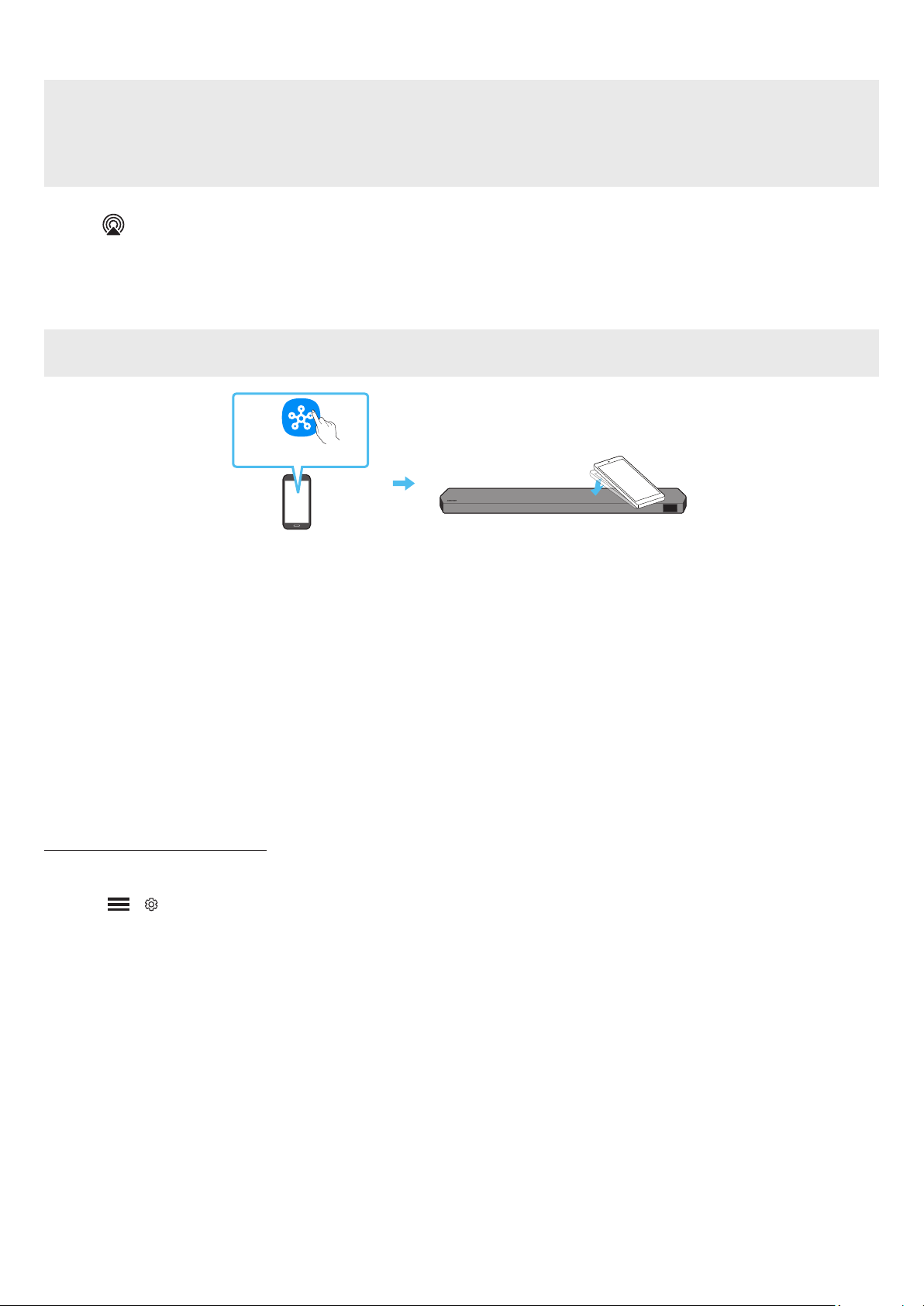
Tap the Soundbar with your mobile device to play the sound of content on the mobile device through the Soundbar.
This function may not be supported, depending on the mobile device.
This function is only compatible with Samsung mobile devices with Android 8.1 or later.
Top of the Soundbar
Mobile device
SmartThings App
1. Turn on the Tap Sound function on your mobile device.
For details on how to turn on the function, refer to Setting the Tap Sound function” below.
2. Tap the Soundbar with the mobile device. Select Start now in the displayed message window.
A connection is established between the mobile device and Soundbar via Bluetooth.
3. Play the sound of content on the mobile device through the Soundbar.
This function connects a mobile device to the Soundbar via Bluetooth by detecting vibration that occurs when the device touches the
Soundbar.
Make sure the mobile device does not tap a sharp corner of the Soundbar. The Soundbar or mobile device may become scratched or
damaged.
It is recommended that the mobile device be covered with a case. Lightly tap the wide area in the upper portion of the Soundbar, without
using excessive force.
To use this function, update the SmartThings app to the latest version.
The function may not be supported, depending on the app version.
Setting the Tap Sound function
Use the SmartThings app to turn on the Tap View, Tap Sound function.
1. On the mobile device, run the SmartThings app.
2. Select ( ) in the SmartThings app screen displayed on the mobile device.
3. Set “Tap View, Tap Sound to On to allow the function to work when a mobile device moves close to the Soundbar. The function is turned on.
NOTE
When the mobile device is in power-saving mode, the Tap Sound function does not work.
The Tap Sound function may not work if there are devices near the Soundbar that cause radio interference such as electric devices. Make sure
devices that may cause radio interference are placed at a sufcient distance away from the Soundbar.
Scarica il manuale in italiano (PDF, 244.0 MB)
(Rispetta l’ambiente e stampa questo manuale solo se è veramente necessario)

Loading…

Valutazione

Facci sapere che cosa pensi della Samsung HW-Q700D Sistema home theater valutando il prodotto. Vuoi condividere la tua esperienze con questo prodotto o porre una domanda? Ti preghiamo di lasciare un commento al fondo della pagina.
Sei soddisfatto di Samsung HW-Q700D Sistema home theater?
No
Valuta per primo questo prodotto
0 voti

Partecipa alla conversazione su questo prodotto

Qui puoi condividere cosa pensi di Samsung HW-Q700D Sistema home theater. Se hai una domanda, leggi prima attentamente il manuale. La richiesta di un manuale può essere effettuata utilizzando il nostro modulo di contatto.

Maggiori informazioni su questo manuale

Comprendiamo che sia bello avere un manuale cartaceo per i tuoi Samsung HW-Q700D Sistema home theater. Puoi sempre scaricare il manuale dal nostro sito web e stamparlo tu stesso. Se desideri avere un manuale originale, ti consigliamo di contattare Samsung. Potrebbero essere in grado di fornire un manuale originale. Stai cercando il manuale del tuo Samsung HW-Q700D Sistema home theater in un'altra lingua? Scegli la tua lingua preferita sulla nostra home page e cerca il numero del modello per vedere se è disponibile.

Specifiche

Marca Samsung
Modello HW-Q700D
Categoria Sistemi home theater
Tipo di file PDF
Dimensione del file 244.0 MB

Tutti i manuali per Samsung Sistemi home theater
Altri manuali di Sistemi home theater
Manuale Samsung HW-Q700D Sistema home theater

Prodotti correlati

Categorie correlate

×
Download