Manuale Samsung HW-Q700D Sistema home theater

Hai bisogno di un manuale per il tuo Samsung HW-Q700D Sistema home theater? Di seguito è possibile visualizzare e scaricare gratuitamente il manuale in PDF in italiano. Questo prodotto attualmente ha 0 domande frequenti, 0 commenti e ha 0 voti. Se questo non è il manuale che desideri, contattaci.

Il tuo prodotto è difettoso e il manuale non fornisce alcuna soluzione? Rivolgiti a un Repair Café per il servizio di riparazione gratuita.

Manuale

Loading…
ENG - 22
06 CONNECTING AN EXTERNAL DEVICE
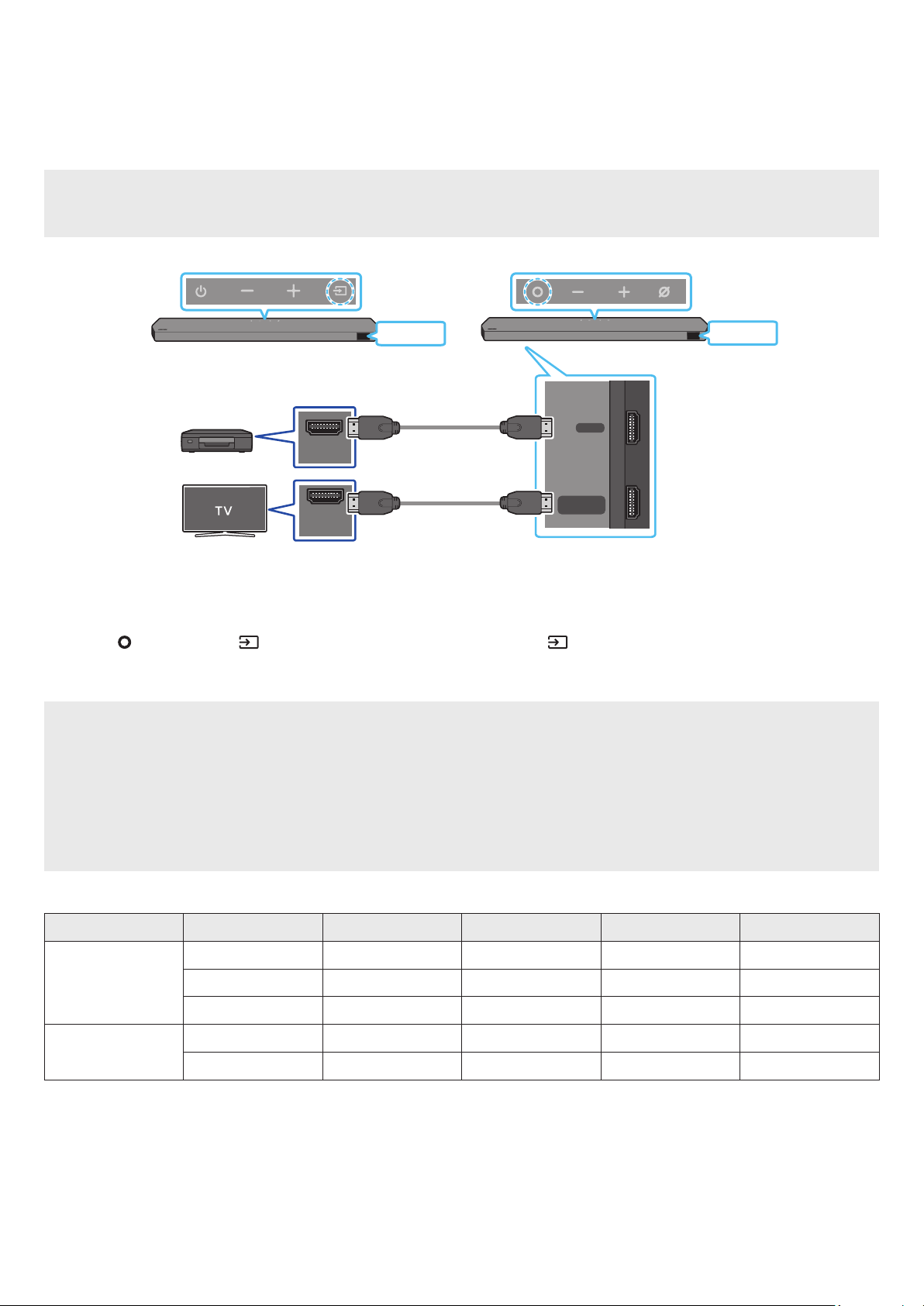
Method 1. Connecting using an HDMI Cable (Capable of Dolby Atmos / DTS:X decoding
and playback)
Pre-connection Checklist
If the Audio Output options include Secondary Audio, make sure Secondary Audio is set to Off.
Make sure that the content supports Dolby Atmos® / DTS:X.
DIGITAL AUDIO IN
(OPTICAL)
HDMI TO TV
(eARC/ARC)
HDMI
HDMI IN
(ARC)
HDMI OUT
Bottom of the Soundbar
HDMI
HDMI
External Device
HDMI Cable
HDMI Cable
(supplied)
Top of the Soundbar
Top of the Soundbar
<HW-Q930D / HW-Q800D><HW-Q700D>
1. Use an HDMI cable to connect the HDMI OUT port on the external device and the HDMI port on the bottom of the Soundbar.
2. Use an HDMI cable (supplied) to connect the HDMI IN port of the TV and the HDMI TO TV (eARC/ARC) port on the bottom of the Soundbar.
3. Turn on the Soundbar, TV, and the external device.
4. Press the (Multi Function) / (Source) button on the top of the Soundbar or the (Source) button on the remote control to select
HDMI” mode.
5. The Soundbar display indicates that “HDMI mode is currently selected and the Soundbar will start playing sounds.
NOTE
When you use Dolby Atmos® / DTS:X: If the input source is Dolby Atmos® / DTS:X, refer to 
effect modes on page 8.
When Dolby Atmos® is activated, DOLBY ATMOS” appears in the front display.
When DTS:X is activated, DTS:X” appear in the front display.

Open the audio output options on the settings menu of your BD player or other device and make sure that “No Encoding” is selected for
Bitstream. For example, on a Samsung BD Player, go to Home Menu → Sound → Digital Output and then select Bitstream (unprocessed).

Frame rate (fps) Color depth    
< 60
8 bit O O O O
10 bit - - O O
12 bit - - O O
120
8 bit - - - -
10 bit - - - -
Supported specication may vary depending on the connected external device or usage conditions.
Scarica il manuale in italiano (PDF, 244.0 MB)
(Rispetta l’ambiente e stampa questo manuale solo se è veramente necessario)

Loading…

Valutazione

Facci sapere che cosa pensi della Samsung HW-Q700D Sistema home theater valutando il prodotto. Vuoi condividere la tua esperienze con questo prodotto o porre una domanda? Ti preghiamo di lasciare un commento al fondo della pagina.
Sei soddisfatto di Samsung HW-Q700D Sistema home theater?
No
Valuta per primo questo prodotto
0 voti

Partecipa alla conversazione su questo prodotto

Qui puoi condividere cosa pensi di Samsung HW-Q700D Sistema home theater. Se hai una domanda, leggi prima attentamente il manuale. La richiesta di un manuale può essere effettuata utilizzando il nostro modulo di contatto.

Maggiori informazioni su questo manuale

Comprendiamo che sia bello avere un manuale cartaceo per i tuoi Samsung HW-Q700D Sistema home theater. Puoi sempre scaricare il manuale dal nostro sito web e stamparlo tu stesso. Se desideri avere un manuale originale, ti consigliamo di contattare Samsung. Potrebbero essere in grado di fornire un manuale originale. Stai cercando il manuale del tuo Samsung HW-Q700D Sistema home theater in un'altra lingua? Scegli la tua lingua preferita sulla nostra home page e cerca il numero del modello per vedere se è disponibile.

Specifiche

Marca Samsung
Modello HW-Q700D
Categoria Sistemi home theater
Tipo di file PDF
Dimensione del file 244.0 MB

Tutti i manuali per Samsung Sistemi home theater
Altri manuali di Sistemi home theater
Manuale Samsung HW-Q700D Sistema home theater

Prodotti correlati

Categorie correlate

×
Download