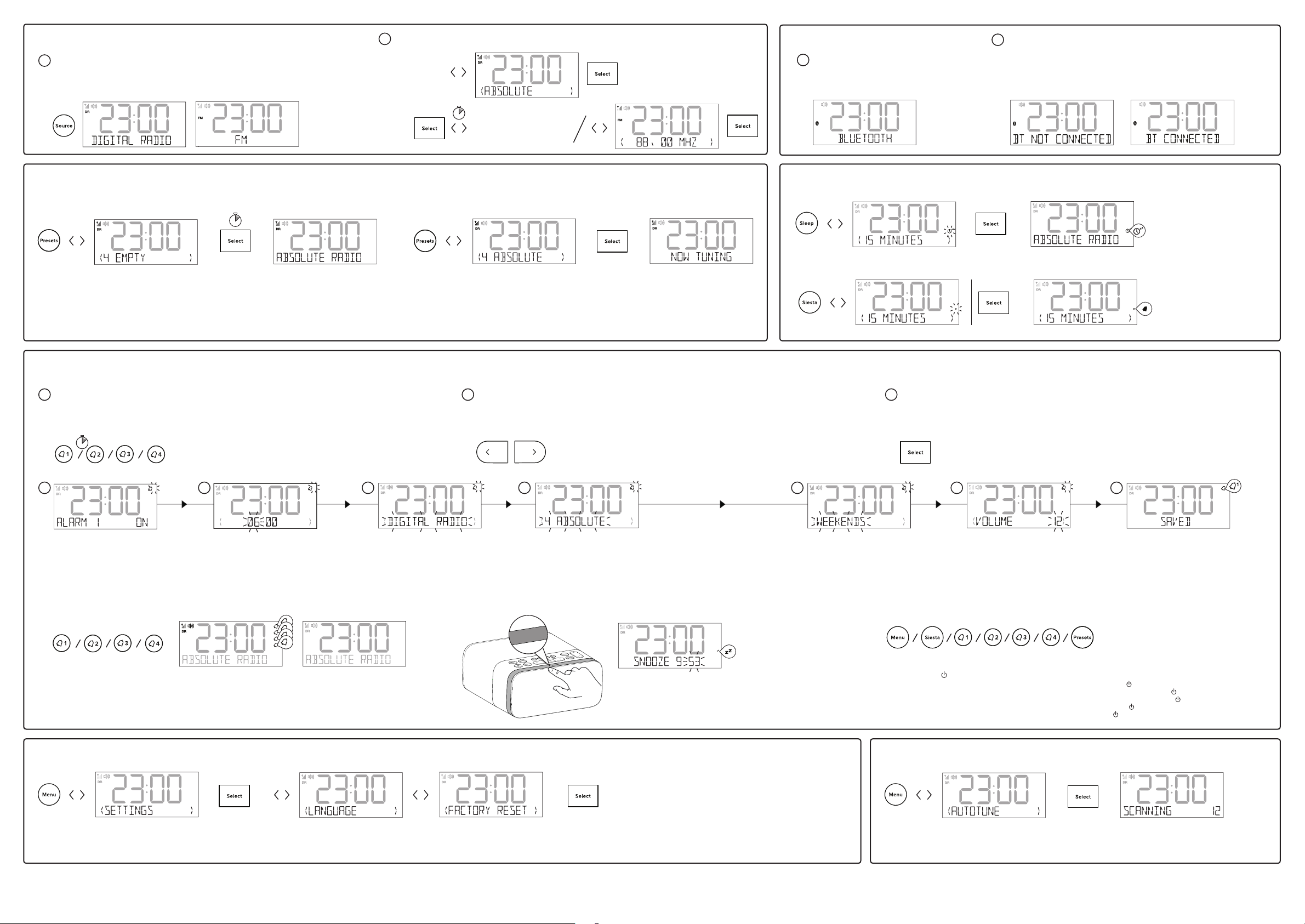
Set the language
Sprache einstellen • Régler la langue •
Impostare la lingua • indstille sproget •
De taal instellen
Press Alarm buttons to toggle alarms on or o
Alarm-Tasten drücken zum Ein- bzw. Ausschalten des Alarms • Appuyer sur les boutons de l’alarme pour allumer ou éteindre
les alarmes • Premere i pulsanti Sveglia per attivare/disattivare le sveglie •Tryk på alarmknapperne for at tænde eller slukke
for alarmen • Druk op wekkerknoppen om wekkers afwisselend aan of uit te zetten
1
2
3
4
1
1
1
1
1
1
1
1
1
2
3
4
1
2
3
4
1
2
3
4
CD
8888888888888888
1
2
3
4
1
1
1
1
1
1
1
1
1
2
3
4
1
2
3
4
1
2
3
4
CD
8888888888888888
1
2
3
4
1
1
1
1
1
1
1
1
1
2
3
4
1
2
3
4
1
2
3
4
CD
8888888888888888
1
2
3
4
1
1
1
1
1
1
1
1
1
2
3
4
1
2
3
4
1
2
3
4
CD
8888888888888888
1
2
3
4
1
1
1
1
1
1
1
1
1
2
3
4
1
2
3
4
1
2
3
4
CD
8888888888888888
1
2
3
4
1
2
3
4
1
2
3
4
1
1
1
1
1
1
1
1
1
2
3
4
1
2
3
4
1
2
3
4
CD
8888888888888888
1
2
3
4
1
1
1
1
1
1
1
1
1
2
3
4
1
2
3
4
1
2
3
4
CD
8888888888888888
1
2
3
4
1
1
1
1
1
1
1
1
1
2
3
4
1
2
3
4
1
2
3
4
CD
8888888888888888
1
2
3
4
1
1
1
1
1
1
1
1
1
2
3
4
1
2
3
4
1
2
3
4
CD
8888888888888888
1
2
3
4
1
1
1
1
1
1
1
1
1
2
3
4
1
2
3
4
1
2
3
4
CD
8888888888888888
1
2
3
4
1
1
1
1
1
1
1
1
1
2
3
4
1
2
3
4
1
2
3
4
CD
8888888888888888
1
2
3
4
1
1
1
1
1
1
1
1
1
2
3
4
1
2
3
4
1
2
3
4
CD
8888888888888888
1
2
3
4
1
1
1
1
1
1
1
1
1
2
3
4
1
2
3
4
1
2
3
4
CD
8888888888888888
1
2
3
4
1
1
1
1
1
1
1
1
1
2
3
4
1
2
3
4
1
2
3
4
CD
8888888888888888
1
2
3
4
1
1
1
1
1
1
1
1
1
2
3
4
1
2
3
4
1
2
3
4
CD
8888888888888888
1
2
3
4
1
1
1
1
1
1
1
1
1
2
3
4
1
2
3
4
1
2
3
4
CD
8888888888888888
Snooze
Select preset number
Speicherplatz-Nummer auswählen
• Choisir le numéro de présélection
• Selezionare il numero di
preselezione •Vælg forudindstillet
nummer •Voorkeuzennummer
selecteren
Press and hold Select for 2 seconds to store
Taste Select drücken und 2 Sekunden lang gedrückt halten zum
Speichern • Appuyer sur
« Select » et maintenir l’appui pendant 2 secondes pour
enregistrer • Per memorizzare, premere e tenere premuto Select
per 2 secondi •Tryk på Select, og hold den nede i 2 sekunder for
at gemme • Houd Select 2 seconden ingedrukt om op te slaan
Select preset number
Speicherplatz-Nummer auswählen
• Choisir le numéro de présélec-
tion • Selezionare il numero di
preselezione • Vælg forudindstillet
nummer • Voorkeuzennummer
selecteren
Press Select to tune in
Zum Auswählen Auswahl drücken • Appuyer sur « Select
» pour se caler sur la station • Premere Seleziona per
sintonizzare •Tryk på valgknappen for at indstille • Druk op
Select (selecteren) om af te stemmen
Alarm 1/2/3/4 on Alarm 1/2/3/4 o
Cancelling a sounding alarm
Press any of the buttons shown above to cancel a sounding alarm.
Press Standby (
) to turn Siesta o
Drücken Sie eine der oben gezeigten Tasten, um einen Alarm zu löschen. Standby (
) drücken zum Ausschalten des Siesta •
Appuyez sur l’un des boutons ci-dessus pour annuler une alarme sonore. Appuyer sur « Standby » (
) pour éteindre Siesta •
Premere uno dei pulsanti sopra indicati per annullare un allarme sonoro. Premere l’icona di standby (
) per spegnere Siesta
• Tryk på en af knapperne vist ovenfor for at annullere en lydalarm. Tryk på Standby (
) for at slukke Siesta • Druk op een van
de bovenstaande knoppen om een klinkalarm te annuleren. Druk op stand-by (
) om de Siesta uit te zetten
Alarm setup • Alarm-Setup • Mise en alarme • Impostazione la sveglia• Indstil alarm • Instellen wekker
Reset to factory settings
Auf Werkseinstellungen zurücksetzen • Réinitialisez les
paramétrages d’usine • Ripristina le impostazioni predefinite •
Gendan fabriksindstillinger • Herstel de fabrieksinstellingen
Radio Digital and FM radio • Frequencies DAB/DAB+, FM radio 87.5-108 MHz • Bluetooth - Frequency range: 2402<2480 MHz - Maximum power: -6.29 dBm (EIRP) • Power 100-240V AC to 5.5V (2A) DC Micro USB external power adapter • Input connectors 5.5V (2A) Micro USB power
adapter socket (also for software updates) • Output connectors USB-A (1A) socket for charging phone or tablet, 3.5mm headphone socket • Software version v1.0 • Aerial Wire aerial attached
Press SnoozeTouch band to snooze a sounding alarm
Drücken Sie SnoozeTouch Band einen Weckton Snooze • Appuyez sur bande
SnoozeTouch pour une alarme sonore Snooze • Premere SnoozeTouch per
annullare un allarme sonoro • Tryk på SnoozeTouch-båndet for at snooze en
lydalarm • Druk SnoozeTouch band twee snooze een alarm
Snoozing a sounding alarm
1
2
3
4
1
1
1
1
1
1
1
1
1
2
3
4
1
2
3
4
1
2
3
4
CD
8888888888888888
1
2
3
4
1
1
1
1
1
1
1
1
1
2
3
4
1
2
3
4
1
2
3
4
CD
8888888888888888
Hold down alarm button 1/2/3/4
for 3 seconds
Halten Sie die Alarm-Tasten (1/2/3/4) für drei Sekunden gedrückt • Appuyez sur la touches Alarmes (1/2/3/4) pendant plus
de 3 secondes • Premere e mantenere premuto i tasti Alarme (1/2/3/4) per 3 secondi • Knapper Alarmer (1/2/3/4) holdes
nede i 3 sekunder • Houdt u de knop Wekker (1/2/3/4) voor 3 seconden
1
Press to scroll through and adjust options as shown below (steps A-G)
Drücken zum Scrollen und zum Einstellen der Optionen wie nachfolgend gezeigt (Schritte A-G) • Appuyer pour faire
défiler et choisir les options, comme indiqué ci-dessous (étapes A à G) • Premere per scorrere e regolare le opzioni (punti
A-G) • Tryk for at rulle gennem og justere indstillingerne som vist nedenfor (trin A-G) • Indrukken om te scrollen door de
opties en deze te veranderen zoals hieronder is aangegeven (stappen A-G)
2
Press to confirm settings and move to next step
Drücken zum Bestätigen der Einstellungen und zur Fortsetzung mit der nächsten Schritt • Appuyer pour confirmer
les réglages et se rendre à l’étape suivante • Premere per confermare le impostazioni e passare all’punto successivo
• Tryk for at bekræfte indstillingerne, og skift til næste trin • Indrukken om de instellingen te bevestigen en naar de
volgende stap te gaan
3
Turn alarm on or o
Alarm ein- oder ausschalten • Allumer
ou éteindre l’alarme • Attivazione o
disattivazione della sveglia • Tænd
eller sluk for alarmen • Wekker aan- of
uitzetten
1
1
1
1
1
1
1
1
1
2
3
4
1
2
3
4
1
2
3
4
CD
8888888888888888
A
Set alarm hour and minutes
Alarmzeit (Stunden und Minuten)
einstellen • Régler l’heure et les minutes
de l’alarme • Impostazione ore/minuti
della sveglia • Vælg timer og minutter for
alarmen • Uur en minuut van de wekker
instellen
1
1
1
1
1
1
1
1
2
3
4
1
2
3
4
1
2
3
4
CD
8888888888888888
B
Radio
Press Source to select digital or FM radio
Drücken Source für umschalten zwischen digitale Radio und UKW-Radio • Appuyez Source pour permuter
entre la radio numérique et la radio FM • Premere Source per cambiare tra radio digitale e FM • Tryk Source
for at skifte mellem DAB-radio og FM-radio •Druk Source knoppen te schakelen tussen digitale en FM radio
1
Change radio station
Sender wechseln • Changer la station • Cambia stazione • Skift station • Verander radiozender
2
Digital radio
Radio numerique
• Radio digitale •
DAB-radio
FM
UKW
Presets
Store
Acheter • Memorizzazione • Gem • Opslaan
Select
Senderwahl • Sélectionner • Seleziona • Vælg • Selecteren
Sleep timer • Sleep-Timer • Minuteur de mise en veille • Timer di autospegnimento • Slaaptimer
Switching an alarm on or o
Settings Menu
Autotune • Syntonisation automatique • Sintonizzazione automatica
1
2
3
4
1
1
1
1
1
1
1
1
1
2
3
4
1
2
3
4
1
2
3
4
CD
8888888888888888
1
2
3
4
1
1
1
1
1
1
1
1
1
2
3
4
1
2
3
4
1
2
3
4
CD
8888888888888888
Bluetooth
Press Source to select Bluetooth
Drücken sie die Quelle, um Bluetooth auszuwählen • Appuyez
sur la source pour sélectionner Bluetooth • Premere la
sorgente per selezionare Bluetooth • Tryk på kilde for at vælge
Bluetooth • Druk op de bron om Bluetooth te selecteren
1
On your Bluetooth device, switch Bluetooth on and connect to your Siesta
Aktivieren Sie die Bluetooth-Funktion des anzuschließenden Geräts und nehmen Sie
Verbindung zu dem Siesta auf • Sur votre appareil Bluetooth, activez la fonction Bluetooth
et connectez-vous à votre Siesta • Attivare la funzione Bluetooth sul dispositivo Bluetooth
e collegarlo alla radio Siesta • På Bluetooth-enheten din, skal du slå på Bluetooth og koble
til Siesta • Schakel op het andere apparaat de Bluetooth-functie in en koppel het apparaat
met de Siesta
2
Siesta timer • Siesta-timer • Minuteur de Siesta • Timer da Siesta
1
2
3
4
1
1
1
1
1
1
1
1
1
2
3
4
1
2
3
4
1
2
3
4
CD
8888888888888888
1
2
3
4
1
1
1
1
1
1
1
1
1
2
3
4
1
2
3
4
1
2
3
4
CD
8888888888888888
Set alarm type
Alarmtyp einstellen • Régler le type
d’alarme • Impostazione del tipo di
sveglia • Indstil alarmtype • Type
wekker instellen
1
1
1
1
1
1
2
3
4
1
2
3
4
1
2
3
4
CD
8888888888888888
C
Specifications
Seek
• Automatische Sendersuche
• Syntonisation automatique
• Sintonizzazione
• Automatisk indstilling
• Stations automatisch zoeken
Select ‘Last used’ or a preset station (radio alarm only)
Wählen Sie zwischen ‘Zuletzt genutzt’ und einem gespeicherten (nur Radio-
Alarm) • Choisissez entre l’option « Derniere utilisation» ou une station
présélectionnée (uniquement pour le mode radio-réveil) • Scegliere tra ‘Ultimo
uso’ o una stazione preselezionata (solo sveglia con radio) • Vælg mellem ‘Last
tuned’ (Seneste indstilling) eller en fast station (kun radioalarm) • Kies tussen ‘Last
tuned’ (laatste digitale zender) en een voorkeuzezender (alleen radiowekker)
1
1
1
1
1
2
3
4
1
2
3
4
1
2
3
4
CD
8888888888888888
D
Set repeat frequency
Wiederholfrequenz festlegen • Régler la
fréquence de répétition • Impostazione
dellla frequenza di ripetizione • Indstil
gentag frekvens • Herhalingsfrequentie
instellen
1
1
1
1
2
3
4
1
2
3
4
1
2
3
4
CD
8888888888888888
E
Set alarm volume
Alarm-Lautstärke einstellen • Régler le
volume de l’alarme • Impostazione del
volume della sveglia • Indstil alarm-
lydstyrke • Wekvolume instellen
1
1
1
2
3
4
1
2
3
4
1
2
3
4
CD
8888888888888888
F
Save alarm
Alarm speichern • Enregistrer l’alarme •
Salvataggio della sveglia • Gem alarm •
Wekker opslaan
1
1
2
3
4
1
2
3
4
1
2
3
4
CD
8888888888888888
G
FOLD HERE
FOLD HERE
FOLD HERE FOLD HERE FOLD HERE
FOLD HERE
FOLD HEREFOLD HERE


Partecipa alla conversazione su questo prodotto
Qui puoi condividere cosa pensi di Pure Siesta S6 Sveglia. Se hai una domanda, leggi prima attentamente il manuale. La richiesta di un manuale può essere effettuata utilizzando il nostro modulo di contatto.
rispondi | È stato utile (4) (Tradotto da Google)
rispondi | È stato utile (2) (Tradotto da Google)
rispondi | È stato utile (2) (Tradotto da Google)