Manuale Pioneer MVH-290DAB Autoradio

Hai bisogno di un manuale per il tuo Pioneer MVH-290DAB Autoradio? Di seguito è possibile visualizzare e scaricare gratuitamente il manuale in PDF in italiano. Questo prodotto attualmente ha 4 domande frequenti, 0 commenti e ha 0 voti. Se questo non è il manuale che desideri, contattaci.

Il tuo prodotto è difettoso e il manuale non fornisce alcuna soluzione? Rivolgiti a un Repair Café per il servizio di riparazione gratuita.

Manuale

Loading…
4En
2 Turn the M.C. dial to select the options, then press to confirm.
To proceed to the next menu option, you need to confirm your selection.
3 [QUIT :YES] appears when all the settings have been made.
To return to the first item of the setup menu, turn the M.C
. dial to select [QUIT :NO],
then press to confirm.
4 Press the M.C. dial to confirm the settings.
When [DAB ANT PW] is set to [ON], [UPDATING LIST] appears in the display and the
se
rvice list will be updated.
NOTES
You can cancel the menu setting by pressing SRC/OFF.
These settings can be made at any time from the SYSTEM settings (page 11) and INITIAL settings
(page 4).
1 Press the M.C. dial to display the main menu.
2 Turn the M.C. dial to select [SYSTEM], then press to confirm.
3 Turn the M.C. dial to select [DEMO OFF], then press to confirm.
4 Turn the M.C. dial to select [YES], then press to confirm.
1 Press and hold SRC/OFF until the unit turns off.
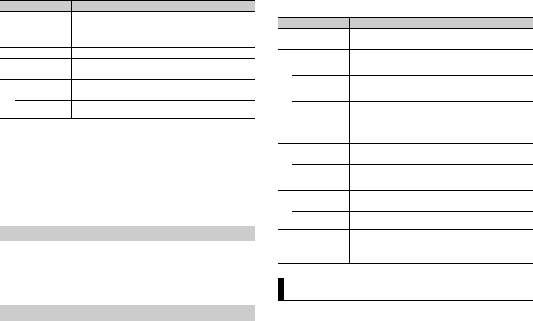
Menu Item Description
LANGUAGE Select the language to display the text information from a
c
ompressed audio file.
[ENG](English),
[РУС
](Russian),
[TUR](Turkish)
CLOCK SET Set the clock.
FM STEP Select the FM tuning step from 100 kHz or 50 kHz.
[100], [50]
DAB ANT PW Supply power to a DAB antenna. Select this when using the
op
tional DAB antenna (AN-DAB1, sold separately) with the unit.
[ON]
[OFF] No power is supplied to a DAB antenna. Select this when using a
passive antenna with no booster.
Canceling the demonstration display (DEMO OFF)
INITIAL settings
2 Press and hold SRC/OFF to display the main menu.
3 Turn the M.C. dial to select [INITIAL], then press to confirm.
4 Turn the M.C. dial to select an option, then press to confirm.
To receive DAB signals, connect a DAB antenna (AN-DAB1) (sold separately) to the unit.
Menu Item Description
FM STEP Select the FM tuning step from 100 kHz or 50 kHz.
[100], [50]
SP-P/O MODE Select when there is a full-range speaker connected to the rear
s
peaker output leads and there is a subwoofer connected to the
RCA output.
[REAR/SUB.W]
[SUB.W/SUB.W] Select when there is a passive subwoofer connected directly to
t
he rear speaker output leads and there is a subwoofer
connected to the RCA output.
[REAR/REAR] Select when there are full-range speakers connected to the rear
speaker output leads and RCA output. If there is a full-range
speaker connected to the rear speaker output leads, and the
RCA output is not used, you may select either [REAR/SUB.W] or
[REAR/REAR].
S/W UPDATE Select to confirm the latest system information on the unit.
[SYSTEM INFO]
[SYSTEM UPDATE] Select to update the unit to the latest software and initialize the
u
nit settings. For details on the latest software and updating,
visit our website.
DAB ANT PW Supply power to a DAB antenna. Select this when using the
opt
ional DAB antenna (AN-DAB1, sold separately) with the unit.
[ON]
[OFF] No power is supplied to a DAB antenna. Select this when using a
pas
sive antenna with no booster.
SYSTEM RESET Select [YES] to initialize the unit settings. The unit will be
r
estarted automatically.
(Some of the settings may be retained even after resetting the
uni
t.)
[YES], [NO]
Digital Audio Broadcasting (DAB)
Scarica il manuale in italiano (PDF, 9.78 MB)
(Rispetta l’ambiente e stampa questo manuale solo se è veramente necessario)

Loading…

Valutazione

Facci sapere che cosa pensi della Pioneer MVH-290DAB Autoradio valutando il prodotto. Vuoi condividere la tua esperienze con questo prodotto o porre una domanda? Ti preghiamo di lasciare un commento al fondo della pagina.
Sei soddisfatto di Pioneer MVH-290DAB Autoradio?
No
Valuta per primo questo prodotto
0 voti

Partecipa alla conversazione su questo prodotto

Qui puoi condividere cosa pensi di Pioneer MVH-290DAB Autoradio. Se hai una domanda, leggi prima attentamente il manuale. La richiesta di un manuale può essere effettuata utilizzando il nostro modulo di contatto.

Maggiori informazioni su questo manuale

Comprendiamo che sia bello avere un manuale cartaceo per i tuoi Pioneer MVH-290DAB Autoradio. Puoi sempre scaricare il manuale dal nostro sito web e stamparlo tu stesso. Se desideri avere un manuale originale, ti consigliamo di contattare Pioneer. Potrebbero essere in grado di fornire un manuale originale. Stai cercando il manuale del tuo Pioneer MVH-290DAB Autoradio in un'altra lingua? Scegli la tua lingua preferita sulla nostra home page e cerca il numero del modello per vedere se è disponibile.

Specifiche

Marca Pioneer
Modello MVH-290DAB
Categoria Autoradio
Tipo di file PDF
Dimensione del file 9.78 MB

Tutti i manuali per Pioneer Autoradio
Altri manuali di Autoradio

Domande frequenti su Pioneer MVH-290DAB Autoradio

Il nostro team di supporto cerca informazioni utili sul prodotto e risposte alle domande più frequenti. Se trovi un’inesattezza nelle nostre domande frequenti, ti preghiamo di farcelo sapere utilizzando il nostro modulo di contatto.

Che cos’è DAB+? Verificato

DAB+ è il successore del segnale FM e sta per Digital Audio Broadcasting. Si tratta di un segnale digitale che permette di ascoltare più canali nella stessa larghezza di banda e di passare più facilmente da un canale all’altro.

È stato utile (638) Per saperne di più

Qual è la differenza tra FM e AM? Verificato

FM e AM sono due forme di modulazione utilizzate per trasmettere un segnale. FM sta per modulazione di frequenza e AM sta per modulazione di ampiezza. AM è la vecchia forma di modulazione. La differenza principale è che il segnale FM è molto più forte del segnale AM.

È stato utile (409) Per saperne di più

Un CD si è inceppato nell’autoradio, cosa devo fare? Verificato

Alcune autoradio hanno una funzione per espellere i CD inceppati. Spegnere l’auto e premere il pulsante “on” e “eject” simultaneamente per 10 secondi. Se non funziona, riavviare l’auto e riprovare.

È stato utile (390) Per saperne di più

Quale misura di autoradio è adatta alla mia automobile? Verificato

Esistono due misure di autoradio standard, 1-DIN e 2-DIN. 1-DIN è la versione standard sottile e la 2-DIN è la versione alta il doppio. Le autoradio 2-DIN di solito hanno più spazio per uno schermo che consente di visualizzare i dati di navigazione o riprodurre filmati.

È stato utile (328) Per saperne di più
Manuale Pioneer MVH-290DAB Autoradio

Prodotti correlati

Categorie correlate

×
Download