
Manuale Karlsson KA6124RD Orologio

Hai bisogno di un manuale per il tuo Karlsson KA6124RD Orologio? Di seguito è possibile visualizzare e scaricare gratuitamente il manuale in PDF in italiano. Questo prodotto attualmente ha 3 domande frequenti, 0 commenti e ha 0 voti. Se questo non è il manuale che desideri, contattaci.

Il tuo prodotto è difettoso e il manuale non fornisce alcuna soluzione? Rivolgiti a un Repair Café per il servizio di riparazione gratuita.

Manuale

Loading…

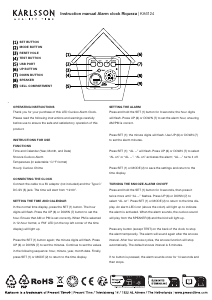
Instruction manual Alarm clock Riqueza | KA6124
To turn off the snooze alarm permanently, press and hold the SET
(1) button for 3 seconds, then press it twice until “AL on” ashes.
Press UP (6) or DOWN (7) to select “AL --”, then press SET (1) or
MODE (2). The alarm LED icon will disappear.
HOURLY CUCKOO CHIME
This clock chimes every hour but remains silent from 10:00 pm to
6:00 am. The rst chime is at 7:00 am, and this start time can be
adjusted.
To set it: In the normal time display, press and hold the UP (6)
button until “HC07” ashes (“HC07” means the chime starts at
7:00 am). Press UP (6) or DOWN (7) to select a start time between
07:00 and 21:00, then press MODE (2) to return to the time display.
To turn the chime sound off: Press and hold UP (6) until “HC07”
ashes. Press SET (1) to display “HC on”. Press UP (6) or DOWN
(7) to select “HC --”. “HC on” means the chime is active; “HC --”
means off. Press SET (1) or MODE (2) to return to the time display.
If the alarm is set for the same time as the chime, the alarm takes
priority. During silent hours, the alarm will still sound at the set
time.
TEMPERATURE DISPLAY
The display alternates between time and temperature. Press the
DOWN (7) button to switch between Celsius and Fahrenheit.
12/24-HOUR FORMAT
In the normal time display, press UP (6) to switch between 12-hour
and 24-hour format. In 12-hour mode, the ‘PM’ LED lights up
during PM hours.
VIEWING THE YEAR, MONTH, DATE AND ALARM TIME
In the normal time display, press MODE (2) repeatedly to cycle
through: year, month, date, alarm time. Press MODE (2) again to
return to the time display.
BRIGHTNESS LEVELS
The brightness adjusts automatically:
07:00–18:59: High
19:00–22:59: Medium
23:00–06:59: Low
SOUND VOLUME LEVELS
There are three sound volume settings: VOL0, VOL1 and VOL2.
VOL0 = mute
VOL1 = low
VOL2 = high (default)
To adjust: In the normal time display, press and hold MODE (2) until
“VOL2” ashes. Press UP (6) or DOWN (7) to select VOL2, VOL1 or
VOL0. Press MODE (2) to conrm.
If “VOL0” is selected, all sounds (alarm, chime, test sound and button
tones) will be muted.
BACK-UP BATTERY
A CR2032 button cell (not included) can be installed to keep the
clock’s time memory during a power cut. It does not power the clock
itself. Open the battery cover and insert the cell into compartment (9),
making sure the “+” (positive) side faces outward. Close the cover
securely.
TEST (4) BUTTON
Press this button at any time to hear the cuckoo chime sound
immediately.
14. RESET HOLE (3)
If the clock becomes unresponsive (the display freezes), use a slim,
blunt object (such as a ballpoint pen or a toothpick) to press the
RESET hole. The clock will return to the initial time display.
WARNINGS
Keep this product away from liquids.
Clean the clock with a soft cloth or paper towel.
Do not use corrosive cleaners or chemical solutions.
Keep these instructions for future reference.
This product is not a toy. Keep it out of reach of children and animals.
Scarica il manuale in italiano (PDF, 3.29 MB)
(Rispetta l’ambiente e stampa questo manuale solo se è veramente necessario)

Loading…

Valutazione

Facci sapere che cosa pensi della Karlsson KA6124RD Orologio valutando il prodotto. Vuoi condividere la tua esperienze con questo prodotto o porre una domanda? Ti preghiamo di lasciare un commento al fondo della pagina.
Sei soddisfatto di Karlsson KA6124RD Orologio?
No
Valuta per primo questo prodotto
0 voti

Partecipa alla conversazione su questo prodotto

Qui puoi condividere cosa pensi di Karlsson KA6124RD Orologio. Se hai una domanda, leggi prima attentamente il manuale. La richiesta di un manuale può essere effettuata utilizzando il nostro modulo di contatto.

Maggiori informazioni su questo manuale

Comprendiamo che sia bello avere un manuale cartaceo per i tuoi Karlsson KA6124RD Orologio. Puoi sempre scaricare il manuale dal nostro sito web e stamparlo tu stesso. Se desideri avere un manuale originale, ti consigliamo di contattare Karlsson. Potrebbero essere in grado di fornire un manuale originale. Stai cercando il manuale del tuo Karlsson KA6124RD Orologio in un'altra lingua? Scegli la tua lingua preferita sulla nostra home page e cerca il numero del modello per vedere se è disponibile.

Specifiche

Marca Karlsson
Modello KA6124RD
Categoria Orologi
Tipo di file PDF
Dimensione del file 3.29 MB

Tutti i manuali per Karlsson Orologi
Altri manuali di Orologi

Domande frequenti su Karlsson KA6124RD Orologio

Il nostro team di supporto cerca informazioni utili sul prodotto e risposte alle domande più frequenti. Se trovi un’inesattezza nelle nostre domande frequenti, ti preghiamo di farcelo sapere utilizzando il nostro modulo di contatto.

Che cos’è il movimento al quarzo? Verificato

Gli orologi al quarzo sono alimentati a batteria. Questa trasmette corrente ai cristalli di quarzo che emettono delle vibrazioni responsabili del movimento. Dato che le vibrazioni hanno una frequenza fissa, gli orologi al quarzo sono estremamente precisi.

È stato utile (94) Per saperne di più

Che cosa è il GMT? Verificato

GMT sta per Tempo medio di Greenwich (a volte chiamato UTC, tempo coordinato universale). È l’ora alla longitudine 0 che passa da Greenwich, vicino a Londra.

È stato utile (79) Per saperne di più

Cos’è un “cronografo”? Verificato

Un “cronografo” è letteralmente uno “scrittore del tempo”. Questo termine è utilizzato per descrivere gli orologi che indicano l’ora ma che possono anche misurare un determinato periodo di tempo, come un cronometro.

È stato utile (59) Per saperne di più
Manuale Karlsson KA6124RD Orologio
×
Download