2 EN
This burner enables DVDs of videos recorded with the JVC
Hard Disk Camera to be created without using a PC.
● If you want to edit videos recorded with the camera and create
your original DVDs, use the software provided with the camera for
editing and creating DVDs.
● The provided data writing software Power2Go 5.5 Lite can be
used for writing data. However, it cannot be used to edit videos or
create DVDs.
● The burner does not include support for Macintosh.
SOME DO’S AND DON’TS ON THE SAFE
USE OF EQUIPMENT
This equipment has been designed and manufactured to meet
international safety standards but, like any electrical equipment,
care must be taken if you are to obtain the best results and safety
is to be assured.
DO read the operating instructions before you attempt to use the
equipment.
DO ensure that all electrical connections (including the mains plug,
extension leads and interconnections between pieces of
equipment) are properly made and in accordance with the
manufacturer’s instructions. Switch off and withdraw the mains plug
when making or changing connections.
DO consult your dealer if you are ever in doubt about the
installation, operation or safety of your equipment.
DO be careful with glass panels or doors on equipment.
DON’T continue to operate the equipment if you are in any doubt
about it working normally, or if it is damaged in any way ^ switch
off, withdraw the mains plug and consult your dealer.
DON’T remove any fixed cover as this may expose dangerous
voltages.
DON’T leave equipment switched on when it is unattended unless
it is specifically stated that it is designed for unattended operation
or has a standby mode. Switch off using the switch on the
equipment and make sure that your family knows how to do this.
Special arrangements may need to be made for infirm or
handicapped people.
DON’T use equipment such as personal stereos or radios so that
you are distracted from the requirements of road safety. It is illegal
to watch television whilst driving.
DON’T listen to headphones at high volume, as such use can
permanently damage your hearing.
DON’T obstruct the ventilation of the equipment, for example with
curtains or soft furnishings. Overheating will cause damage and
shorten the life of the equipment.
DON’T use makeshift stands and NEVER fix legs with wood
screws ^ to ensure complete safety always fit the manufacturer’s
approved stand or legs with the fixings provided according to the
instructions.
DON’T allow electrical equipment to be exposed to rain or
moisture.
Dear Customer,
Thank you for purchasing this burner. Before use, please read
the safety information and precautions contained in pages 2 and
3 to ensure safe use of this product.
Safety Precautions
IMPORTANT:
In the event that any of the following occur, remove the plug and make
a request for repair to the dealer.
● Smoke or abnormal odor is emitted
● Damage from being dropped
● Water or an object enters inside
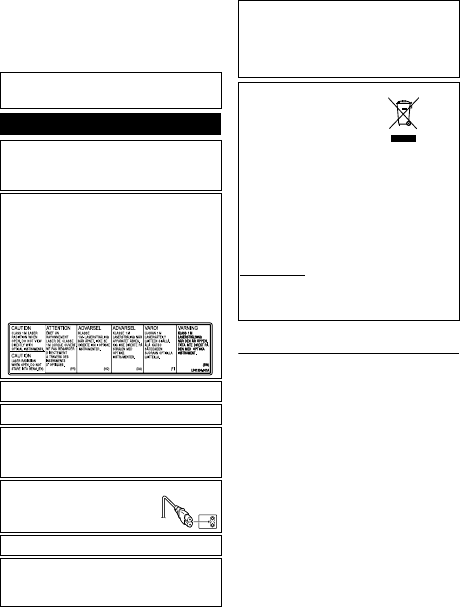
CAUTION:
A UNIT IS A CLASS 1 LASER PRODUCT. HOWEVER THIS UNIT
USES A VISIBLE LASER BEAM WHICH COULD CAUSE
HAZARDOUS RADIATION EXPOSURE IF DIRECTED. BE SURE TO
OPERATE THE UNIT CORRECTLY AS INSTRUCTED.
WHEN THIS UNIT IS PLUGGED INTO THE WALL OUTLET, DO NOT
PLACE YOUR EYES CLOSE TO THE OPENING OF THE DISC TRAY
AND OTHER OPENINGS TO LOOK INTO THE INSIDE OF THIS
UNIT.
USE OF CONTROLS OR ADJUSTMENTS OR PERFORMANCE OF
PROCEDURES OTHER THAN THOSE SPECIFIED HEREIN MAY
RESULT IN HAZARDOUS RADIATION EXPOSURE.
DO NOT OPEN COVERS AND DO NOT REPAIR YOURSELF. REFER
SERVICING TO QUALIFIED PERSONNEL.
CLASS 1 LASER PRODUCT
REPRODUCTION OF LABELS
WARNING LABEL INSIDE OF THE UNIT
This unit applies to the standard “IEC60825-1:2001” for laser
products.
The socket-outlet shall be installed near the equipment and shall be
easily accessible.
ATTENTION:
This unit contains microcomputers. External electronic noise or
interference could cause malfunctioning. In such cases, switch the unit
off and unplug the mains power cord. Then plug it in again and turn the
unit on. Take out the disc. After checking the disc, operate the unit as
usual.
CAUTION:
To avoid electric shock or damage to the unit,
first firmly insert the small end of the power cord
into the AC Adapter until it is no longer wobbly,
and then plug the larger end of the power cord
into an AC outlet.
If malfunctioning occurs, stop using the unit immediately and consult
your local JVC dealer.
● FOR USE WITH MODEL NO. AP-V400U (AC ADAPTER).
● 043-124000-I2 (AC Adapter) is also available for customer using
CU-VD20AC/AG/AS.
● POUR UTILISER AVEC MODELE AP-V400U (ADAPTATEUR CA).
● Le 043-124000-I2 (adaptateur CA) est aussi disponible pour les
modèles CU-VD20AC/AG/AS.
Dear Customer,
This apparatus is in conformance with the valid European directives
and standards regarding electromagnetic compatibility and electrical
safety.
European representative of Victor Company of Japan, Limited is:
JVC Technology Centre Europe GmbH
Postfach 10 05 52
61145 Friedberg
Germany
Information for Users on Disposal of Old Equipment
[European Union]
This symbol indicates that the electrical and
electronic equipment should not be disposed
as general household waste at its end-of-life.
Instead, the product should be handed over
to the applicable collection point for the
recycling of electrical and electronic
equipment for proper treatment, recovery and
recycling in accordance with your national
legislation.
By disposing of this product correctly, you will
help to conserve natural resources and will
help prevent potential negative effects on the environment and human
health which could otherwise be caused by inappropriate waste
handling of this product. For more information about collection point
and recycling of this product, please contact your local municipal
office, your household waste disposal service or the shop where you
purchased the product.
Penalties may be applicable for incorrect disposal of this waste, in
accordance with national legislation.
(Business users)
If you wish to dispose of this product, please visit our web page
www.jvc-europe.com
to obtain information about the take-back of the
product.
[Other Countries outside the European Union]
If you wish to dispose of this product, please do so in accordance with
applicable national legislation or other rules in your country for the
treatment of old electrical and electronic equipment.
Attention:
This symbol is only
valid in the European
Union.
CU-VD20.book Page 2 Thursday, March 1, 2007 5:55 PM



Partecipa alla conversazione su questo prodotto
Qui puoi condividere cosa pensi di JVC CU-VD20 Lettore DVD. Se hai una domanda, leggi prima attentamente il manuale. La richiesta di un manuale può essere effettuata utilizzando il nostro modulo di contatto.