Manuale Finlux FX40269S27YXH LED televisore

Hai bisogno di un manuale per il tuo Finlux FX40269S27YXH LED televisore? Di seguito è possibile visualizzare e scaricare gratuitamente il manuale in PDF in italiano. Questo prodotto attualmente ha 12 domande frequenti, 0 commenti e ha 0 voti. Se questo non è il manuale che desideri, contattaci.

Il tuo prodotto è difettoso e il manuale non fornisce alcuna soluzione? Rivolgiti a un Repair Café per il servizio di riparazione gratuita.

Manuale

Loading…
English - 3 -
WALL MOUNTING WARNINGS
 Read the instructions before mounting your TV
on the wall.
 The wall mount kit is optional. You can obtain from
your local dealer, if not supplied with your TV.
 Do not install the TV on a ceiling or on an inclined
wall.
 8VHWKHVSHFL¿HGZDOOPRXQWLQJVFUHZVDQGRWKHU
accessories.
 7LJKWHQWKHZDOOPRXQWLQJVFUHZV¿UPO\WRSUHYHQW
the TV from fall. Do not over-tighten the screws.
Environmental Information
This television is designed to be environment friendly.
To reduce energy consumption, you can follow these
steps:
If you set the Energy Saving to Minimum, Medium,
Maximum or Auto the TV will reduce the energy
consumption accordingly. If you like to set the
BacklightWRD¿[HGYDOXHVHWDVCustom and adjust
the Backlight (located under the Energy Saving
setting) manually using Left or Right buttons on the
remote. Set as 2ႇWRWXUQWKLVVHWWLQJRႇ
Note: Available Energy SavingRSWLRQVPD\GL௺HUGHSHQGLQJ
on the selected Mode in the System>Picture menu.
The Energy Saving settings can be found in the
System>Picture menu. Note that some picture
settings will be unavailable to be changed.
If pressed Right button while Auto option is selected
or Left button while Custom option is selected,
6FUHHQZඈOOEHRႇඈQVHFRQGV´PHVVDJHZඈOOEH
GඈVSOD\HGRQWKH VFUHHQ6HOHFWProceed and press
OK to WXUQ WKH VFUHHQ Rႇ LPPHGLDWHO\ If you don’t
SUHVVDQ\EXWWRQWKHVFUHHQZLOOEHRႇLQVHFRQGV.
Press any button on the remote or on the TV to turn
the screen on again.
1RWH6FUHHQ 2௺ option is not available if the Mode is set
to Game.
When the TV is not in use, please switch off or
disconnect the TV from the mains plug. This will also
reduce energy consumption.
Features
 Remote controlled colour TV
 Fully integrated digital terrestrial/cable/satellite TV
(DVB-T-T2/C/S-S2/HEVC H.265)
 HDMI inputs to connect other devices with HDMI
sockets
 USB input
 OSD menu system
 Scart socket for external devices (such as DVD
Players, PVR, video games, etc.)
 Stereo sound system
 Teletext
 Headphone connection
 Automatic programming system
 Manual tuning
 Automatic power down after up to eight hours.
 Sleep timer
 Child lock
 Automatic sound mute when no transmission.
 NTSC playback
 AVL (Automatic Volume Limiting)
 PLL (Frequency Search)
 PC input
 Game Mode (Optional)
 3LFWXUHRႇIXQFWLRQ
Accessories Included
 Remote Control
 Instruction Book
 Quick Start Guide
6WDQGE\1RWL¿FDWLRQV
If the TV does not receive any input signal (e.g. from
an
aerial or HDMI source) for 3 minutes, it will go
into standby. When you next switch-on, the following
message will be displayed:
TV switched to stand-by
mode automatically because there was no signal
for a long time.
Press OK to continue.
If the TV is on and it isn’t being operated for a while
it will go into standby. When you next switch-on, the
following message will be displayed.
TV switched to
stand-by mode automatically because no operation
was made for a long time.
Press OK to continue.
TV Control Switch & Operation
1. Up direction
2. Down direction
3. Volume / Info /
Sources List selection
and Standby-On switch
The Control button allows
you to control the Volume/
Programme/Source and
Standby-On functions of
the TV.
To change volume:
Increase the volume by pushing the button up.
Decrease the volume by pushing the button down.
To change channel: Press the middle of the button
in, the information banner will appear on the screen.
English - 4 -
Scroll through the stored channels by pushing the
button up or down.
To change source: Press the middle of the button in
twice(for the second time in total), the source list will
appear on the screen. Scroll through the available
sources by pushing the button up or down.
7RWXUQWKH79RႇPress the middle of the button in
and hold it down for a few seconds, the TV will turn
into standby mode.
To turn on the TV: Press the middle of the button in,
the TV will turn on.
Notes:
 ,I\RXWXUQWKH79RႇWKLVFLUFOHVWDUWVDJDLQEHJLQQLQJ
with the volume setting.
 Main menu OSD cannot be displayed via control
buttons.
Operation with the Remote Control
Press Menu button on your remote control to display
main menu screen. Use the directional buttons to select
a menu tab and press OK to enter. Use the directional
buttons again to select or set an item. Press Return/
Back button or Menu button to quit a menu screen.
Input Selection
Once you have connected external systems to your
79\RX FDQVZLWFK WRGLႇHUHQW LQSXWVRXUFHV3UHVV
Source button on your remote control consecutively
WRVHOHFWWKHGLႇHUHQWVRXUFHV
Changing Channels and Volume
You can change the channel and adjust the volume
by using the Volume +/- and Programme +/- buttons
on the remote.
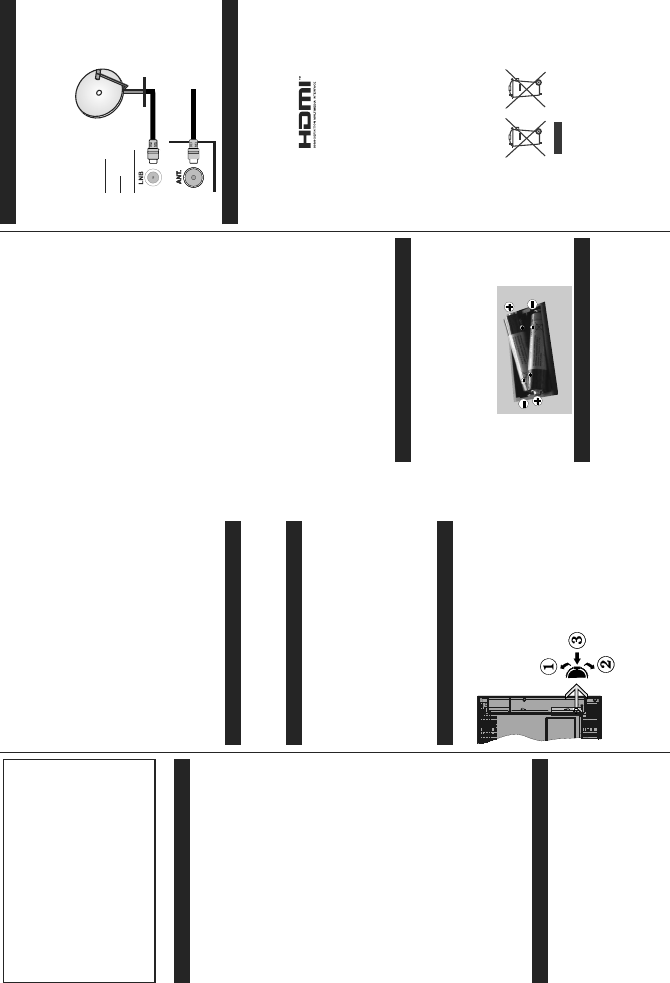
Inserting the Batteries into the Remote
Remove the back cover to reveal the battery
compartment. Insert two size AAA batteries. Make
sure the (+) and (-) signs match (observe correct
polarity). Do not mix old and new batteries. Replace
only with same or equivalent type. Place the cover
back on.
Connect Power
IMPORTANT: The TV set is designed to operate on
9$&+] socket. After unpacking, allow the
TV set to reach the ambient room temperature before
you connect the set to the mains. Plug the power cable
to the mains socket outlet.
Antenna Connection
Connect the aerial or cable TV plug to the AERIAL
INPUT (ANT) socket or satellite plug to the SATELLITE
INPUT (LNB) socket located on the back of the TV.
satellite
REAR
OF
THE TV
aerial
or
cable
/LFHQVH1RWL¿FDWLRQ
7KHWHUPV+'0,DQG+'0,+LJK'H¿QLWLRQ0XOWLPHGLD
Interface, and the HDMI Logo are trademarks or
registered trademarks of HDMI Licensing Administrator,
Inc. in the United States and other countries.
Manufactured under license from Dolby Laboratories.
Dolby, Dolby Audio and the double-D symbol are
trademarks of Dolby Laboratories.
The “CI Plus” Logo is a trademark of CI Plus LLP.
Information for Users on Disposal of Old Equipment
and Batteries
[European Union only]
Equipment bearing these symbols should not be
disposed as general household waste.
You should look for appropriate recycling facilities and
systems for the disposal of these products.
Notice: The sign Pb below the symbol for batteries indicates
that this battery contains lead.
Products
Battery
Scarica il manuale in italiano (PDF, 4.18 MB)
(Rispetta l’ambiente e stampa questo manuale solo se è veramente necessario)

Loading…

Valutazione

Facci sapere che cosa pensi della Finlux FX40269S27YXH LED televisore valutando il prodotto. Vuoi condividere la tua esperienze con questo prodotto o porre una domanda? Ti preghiamo di lasciare un commento al fondo della pagina.
Sei soddisfatto di Finlux FX40269S27YXH LED televisore?
No
Valuta per primo questo prodotto
0 voti

Partecipa alla conversazione su questo prodotto

Qui puoi condividere cosa pensi di Finlux FX40269S27YXH LED televisore. Se hai una domanda, leggi prima attentamente il manuale. La richiesta di un manuale può essere effettuata utilizzando il nostro modulo di contatto.

Maggiori informazioni su questo manuale

Comprendiamo che sia bello avere un manuale cartaceo per i tuoi Finlux FX40269S27YXH LED televisore. Puoi sempre scaricare il manuale dal nostro sito web e stamparlo tu stesso. Se desideri avere un manuale originale, ti consigliamo di contattare Finlux. Potrebbero essere in grado di fornire un manuale originale. Stai cercando il manuale del tuo Finlux FX40269S27YXH LED televisore in un'altra lingua? Scegli la tua lingua preferita sulla nostra home page e cerca il numero del modello per vedere se è disponibile.

Specifiche

Marca Finlux
Modello FX40269S27YXH
Categoria LED televisori
Tipo di file PDF
Dimensione del file 4.18 MB

Tutti i manuali per Finlux LED televisori
Altri manuali di LED televisori

Domande frequenti su Finlux FX40269S27YXH LED televisore

Il nostro team di supporto cerca informazioni utili sul prodotto e risposte alle domande più frequenti. Se trovi un’inesattezza nelle nostre domande frequenti, ti preghiamo di farcelo sapere utilizzando il nostro modulo di contatto.

Come si collega un telecomando universale alla televisione? Verificato

Per collegare un telecomando universale, è necessario disporre del numero di modello e marchio sia del telecomando che della televisione. Nel manuale del telecomando è presente un elenco dei marchi e dei numeri di modello.

È stato utile (5079) Per saperne di più

Quale porta devo utilizzare se voglio collegare una cassa al televisore LED tramite HDMI? Verificato

Utilizzare la porta HDMI-ARC, appositamente pensata per collegare i dispositivi audio.

È stato utile (2367) Per saperne di più

Cosa cambia a quale porta HDMI collego il dispositivo? Verificato

In generale si possono collegare dispositivi come blu-ray o console a qualsiasi porta HDMI. Selezionare quindi il canale HDMI corrispondente sulla televisione per utilizzare il dispositivo.

È stato utile (1189) Per saperne di più

Come misuro i pollici del mio televisore LED? Verificato

Per misurare i pollici del televisore LED occorre misurare la diagonale ad es. tra l’angolo superiore sinistro e quello inferiore destro dello schermo (non il bordo). Un pollice equivale a 2,54 cm, quindi se la misura corrisponde a 99 cm, il televisore LED è di 39 pollici.

È stato utile (942) Per saperne di più

Il mio telecomando funzionerà anche su altri modelli di televisori della stessa marca? Verificato

Spesso il telecomando di un televisore funziona anche su modelli simili della stessa marca. Tuttavia, è insolito che funzioni su tutti i modelli di quel marchio. I telecomandi universali sono più adatti a farlo.

È stato utile (667) Per saperne di più

Qual è la differenza tra LCD e LED? Verificato

Entrambe le tecniche utilizzano uno schermo LCD che non emette luce da solo. La differenza sta nell’illuminazione dietro lo schermo. Negli schermi LCD l’illuminazione avviene grazie al CCFL (lampada a fluorescenza a catodo freddo), mentre i LED utilizzano lampade LED.

È stato utile (531) Per saperne di più

Cosa significa HDMI? Verificato

HDMI è l'acronimo di High-Definition Multimedia Interface. HDMI è una connessione per inviare video e audio di alta qualità da un dispositivo a un altro.

È stato utile (456) Per saperne di più

Si possono riparare da soli i pixel bruciati? Verificato

I pixel bruciati sono diversi dai pixel bloccati. Un pixel bloccato è ancora colorato e può essere sistemato applicando una leggera pressione esattamente sul pixel fino a quando non si ripristina. Un pixel bruciato è sempre bianco o nero e non può essere riparato autonomamente.

È stato utile (424) Per saperne di più

Cos’è il rapporto di contrasto? Verificato

Il rapporto di contrasto indica la distanza tra il bianco più bianco e il nero più nero. Ad esempio un rapporto di contrasto di 400:1 indica che il nero più nero sullo schermo è 400 volte più scuro del bianco più bianco. Un alto rapporto di contrasto aumenta la nitidezza dell’immagine.

È stato utile (402) Per saperne di più

Qual è il modo migliore per pulire un televisore LED? Verificato

Spegnere il televisore ed eliminare lo sporco e la polvere dallo schermo con un panno in microfibra. Non utilizzare della carta che potrebbe rigare lo schermo. Non applicare troppa pressione che potrebbe danneggiare i pixel. Utilizzare un detergente apposito o pulire con una soluzione composta da una parte di aceto e una parte di acqua. Bagnare il panno con la soluzione detergente e pulire lo schermo. Assicurarsi che il panno non sia troppo bagnato. Rimuovere le macchie effettuando dei movimenti circolari. Asciugare lo schermo con un altro panno in microfibra per evitare aloni.

È stato utile (353) Per saperne di più

Qual è la distanza ottimale per guardare la televisione? Verificato

In parte dipende dalle preferenze personali, ma in generale la distanza ottimale di visione è circa 3 volte la dimensione diagonale del televisore. Per un televisore da 60 pollici (152 cm) la distanza di visione ottimale sarebbe di 180 pollici, ovvero 4,5 metri.

È stato utile (353) Per saperne di più

Perché ci sono lettere accanto ai numeri sul telecomando? Verificato

Alcune impostazioni del televisore potrebbero richiedere l'immissione di lettere. Di solito ci sono tre lettere o altri caratteri su un pulsante. Quando è richiesto l'inserimento di lettere, è possibile premere quel pulsante una volta per la prima lettera, premere due volte per la seconda lettera e premere 3 volte per la terza lettera. In questo modo, il testo può essere scritto con un numero minimo di pulsanti.

È stato utile (353) Per saperne di più
Manuale Finlux FX40269S27YXH LED televisore

Prodotti correlati

Categorie correlate

×
Download